
feed all

درباره سایت
آخرین مطالب
- 6 Proven Tips For Becoming A Morning Person
- ClickFuels Review- Build Every Type of Marketing Fuel Quickly
- DreamHost Hosting Promo Code: $50 Discount Septmeber 2016
- SendinBlue WordPress Plugin Review – Email Marketing and Easy Marketing Automation
- How To Make A Content Marketing Strategy That Works!
- Clk.im WordPress Plugin: Monetize Your Website Like Forbes
- How To Create A Checklist In PDF Format For Content Upgrades
- 6 Best WordPress Plugins For Creating Landing Pages Without Coding Skills
- 5 Free Blogging Platforms You Might Not Know About
- The Ultimate Guide for Begiers to Get More Views on Medium
امکانات وب

Let’s start this article with a story about Steve Jobs and Mac.
Many years back, during testing, the Mac took a few minutes to start up. Steve Jobs was furious that it took so long.
He had this to say:
“Well, let’s say you can shave 10 seconds off of the boot time. Multiply that by five million users and that’s 50 million seconds, every single day. Over a year, that’s probably dozens of lifetimes. So if you make it boot ten seconds faster, you’ve saved a dozen lives. That’s really worth it, don’t you think?”
The Mac series of laptops are definitely some of the most solid devices out there compared to their numerous competitors.
Compared to Windows, the Mac is:
- Blazingly fast
- Not prone to viruses
- Doesn’t crash as much
It’s a well thought out machine and this can be attributed to the late Steve Jobs’s obsession with the product.
This kind of obsession undoubtedly makes a great product.
It also makes it a haven for software developers to create wonderful software applications.
Today, we’ll talk about the best social media tools for the Mac OS.
Social media tools are ubiquitous now. A lot are online applications that help in creating content, posting content, and creating systems of automation. But many software developers have been/are still creating applications for the Mac OS.
But why?
Why would you use Desktop Apps instead of Web Apps?
Why would a developer create a desktop application when access to the original web app is a few clicks away through the browser?
One reason is dedicated control and arrangement of features.
Original applications like Facebook, Twitter, and Pinterest have to focus on the UI and the UX of things as well as having all of the necessary features.
A desktop application on the other hand just has to be functional. They give a user the bigger picture by allowing them to access content easily and perform actions with a few simple clicks.
I would say desktop apps are for core users.
So without further ado, let’s get into the best social media tools for the Mac OS.
Note: In our analysis of applications, we’re using the following metrics:
- Last updated: Only updated applications are featured here.
- Price points
- Free/low cost alteatives
Best Social Media Desktop Tools For Mac OS:
You may not be aware of this, but the Mac OS has built-in features that can bring social media right to your OS. All you have to do is go to:
- Apple Menu > System Preferences > Inteet Accounts
A pop-up opens with all social sites like Facebook, Twitter, LinkedIn, and others.
You can individually set up these accounts so that they are integrated into your OS.
For example:
- When LinkedIn is integrated, all of your LinkedIn contacts are synced with your Mac contacts. You can share content and see your LinkedIn feed straight from Safari. You can also share any post, website, or video from your LinkedIn account with two clicks.

A list of social accounts you can coect to your Mac OS

Sign-in to Twitter through your Mac OS

Click on this button in Safari to share any post to any chael

You get a popup asking you permission if you want to post

In the Safari browser, on the left pane, you can see your social feed
- Price: Free
If you are familiar with social media, then you have likely heard of Buffer.
For those of you who aren’t aware, Buffer is a tool used for social media automation where you can schedule your posts to go out at specific times.
- Why is scheduling important?
Apart from saving you time, scheduling also helps in getting your content out at the right time so you can reach the maximum number of people.
Buffer for Mac is a simpler version of the online tool. When you login through your registered Buffer account, all of your accounts are displayed.

Sign-in/Sign-up and access Buffer through the menu bar

Social accounts you can add to Buffer – (Not limited to Twitter and Facebook)
- Price: Free
Instagram is a top application with a lot of content.
I personally prefer to use a desktop application to browse Instagram because I get tired of their online interface. This is where Instafeed swoops in and makes life easy.
Instafeed lets you quickly browse Instagram.
It allows you to:
- Search for hashtags
- Easily subscribe to feeds
- Check out your followers and see if they are following you back
There is also a sharing option where you can share your images on Facebook and Twitter.

Instafeed’s interface with a sidebar full of options

Instagram images right on your desktop with options to download and share
Download Instafeed for Instagram Here

Here’s another great Instagram tool.
With Instamaster, you can:
- Browse photos
- Like
- Comment
- Search
- Tag
You can also save and upload photos (although uploading has some restraints).
- Price: Free
Download Instamaster for Instagram Here
Tweetbot is one of the most popular tools for Twitter.
We can say with confidence that this makes Twitter 10 times better.
Tweetbot makes Twitter much more fluid making it perfect for social media teams that are monitoring and tweeting constantly.
The interface is columnized to allow multiple pieces of information to be shown at once. Users can see their timeline, direct message conversations, and also a list of mentions side by side.
This gives a bird’s eye view of your Twitter activity.
If you are tired from the constant flow of content and want to see only specific posts, then you can use the “mute” feature where you can temporarily “silence” people, hashtags, and tweets.
You can also hide tweets forever (or for a short period of time).

Tweetbot’s all inclusive interface for easy navigation
- Price: $10
Download Tweetbot for Twitter Here
Reddit is a great platform for promotion.
If done carefully, Reddit can make your content go viral in a short amount of time. If you are an expert Redditor who is looking to make their content go viral, Milkeddit will be of immense value.
Milkeddit is a Reddit tool for the Reddit faithful.
With simple swipe actions you can:
- Seamlessly flow through all of your subreddit
- Subscribe to a subreddit
- Bookmark your favorite content
You can also reply, comment, and upload images without any third party software.
There’s also an option to change the theme of your software.

Milkeddit’s Reddit Interface

Milkeddit’s colors can be changed based on your tastes
- As a side bonus, their software updates are fun to read. Here is an excerpt:

Milkeddit’s fuy app updates section
Download Milkeddit for Reddit Here
Uforio is another Reddit Mac app that organizes content into:
- Links
- Pictures
- Videos
- GIFs
- Short Text
- Long Text
There is a favorites bar in which all of your favorite content can be saved for future consumption.
Content that is NSFW or already read can be hidden to avoid repetition (or awkward moments).
It has a minimalistic interface which makes it a breeze to use.
- Price: Free
Download Uforio for Reddit Here
Pin Pro is a tool for Pinterest that will take your Pinterest addiction to a whole new level.
You can access Pinterest straight from the menu bar.
There is a “stealth mode” feature that lets you control the opacity of your Pinterest window which makes it so transparent that only you can see it. I’m not sure if that feature is really to die for, but it’s there…
Images can be uploaded through this application and you can also pin your favorite content.
For serial Pinterest users, this is a great piece of software to keep tabs on your page.

Pin Pro desktop interface

Pin Pro Menu Bar feature and Stealth Mode
- Price: $2
Download Pin Pro for Pinterest Here
This is the “lite version” of Pin Pro.
This version lets you browse through your Pinterest feed and nothing more.
- Price: Free
Download Pin for Pinterest Here
Bonus: Gifox.io
We’ve already covered this in a previous article, so we won’t go into great detail here.
GIFs are doing really well on social media. They are easy to consume and they tell a story in a few seconds.
One can always go to Giphy.com to get memes that represent different things, but if you want to create your own GIF, then you need a tool.
Gifox.io is a perfect tool for making a GIF. It’s completely seamless and the output is great.
(If you work with GIFs, then you must be aware of the massive size of some of them! To have the optimum file size, you will need a GIF compressor like Gifmaker. With Gifmaker, you can resize the GIF by tinkering with the quality.)
We believe these social media desktop tools will help out all serious social media users streamline their social media efforts.
For those of you who have used/are using Mac applications for various social media activities, can you feel the difference between a Mac app and a native browser application?
Also, what other Mac apps help you get social activities done from your desktop?
Let us know in the Idea below!
Did you find this list useful? Share it with your friends on your favorite social media sites!
Subscribe on Youtube
Check your domain ranking
برچسب:
نویسنده: استخدام کار
Keywords are one of the most critical and important parts of SEO.
The basic foundation of SEO is keyword research.
Afterwards, other factors like on-page optimization, quality of content, a good site UI, and some other factors come into the picture.
Many companies invest thousands of dollars to pay for keyword research to get such targeted content.
But you don’t need to do that. Just follow this guide…

The keywords you choose to focus on for your search engine optimization (SEO) efforts are critical to the success of your website’s rank.
Choosing the right keywords isn’t always easy or intuitive and you need a lot of data to know whether a given keyword will work for you.
If you are completely new to keyword research tools and the process of keyword research, here are some guides from the past which will help you understand the basics:
So now you know the basics of keyword research and you have an understanding of how valuable it can be.
Fortunately, there are many tools available that can help you figure out which keywords work the best for your overall web strategy.
Most of these keyword research tools are paid and only a few of them are free.
Best Keyword Research Tools: 2016
1. Google Keyword Plaer <Free>
The Google Keyword Plaer tool is one of the most used and popular keyword research tools out there.
The only reason for it being so popular is it’s free and is directly integrated with Google AdWords.
To start using this tool you need to have an AdWords account (which you can create one for free).
- Features: The biggest feature of the Keyword Plaer tool is the deep information it offers on Google (the largest search engine).
- Limitations: In some ways, that’s also a limitation. If you want to know how your site or a given keyword is doing on other search engines, you won’t get it here.
- Pricing: Free to use.
The Keyword Plaer tool is a good, basic tool for the early stages of a website’s SEO.
This my favorite free tool, but if you need more detailed and competitive analysis, I would recommend going for one of the advanced tools that I have listed below.
Check out the Google AdWords Keyword Plaer here
2. SEMRUSH <14-Day Free Trial (worth $150)>

Everyone always asks me, “What is the best and easiest keyword research tool?”
The answer:
SEMRUSH is not a typical keyword research tool; it offers so much more than just researching keywords.
Unlike other tools where you need to add seed keywords to start your research, here you just need to add your URL (or your competitor’s URL) and it will show you all of the keywords that are ranking for that site.
This makes it easier for you to find short-tail and long-tail keywords that you can target and beat out your competition.
You can get in-depth details on:
- Traffic stats
- Search engine reports
- Adsense CPC
- and so many other details that you need in properly managing an SEO campaign.
This is a highly recommended product.
Download a 14-day (completely free) trial of SEMRUSH here

LongTailPro is a piece of desktop software for keyword research and one of the most popular in this list.
This is a paid keyword research tool which will help you find amazing keywords for your niche/micro-niche sites. With their “platinum” version, you can get a really amazing and really detailed keyword analysis feature.
They also have a competition checker, which will make it easier for you to pick the right keyword.
LongTailPro is available for Mac and Windows.
You can see a detailed review of LongTailPro here.
Get $30 off of LongTailPro here
4. Keyword Spy

Keyword Spy is an SEO optimization tool that’s primarily used for keyword research.
Here’s how you can use Keyword Spy for SEO:
- Uses: Identify competitors’ keywords and do keyword research for SEO campaigns.
- Features:
- Create targeted campaigns
- View competitor keywords
- See rank based on geographical location
- Limitations: The tracking features may not be that useful to smaller businesses or in markets that aren’t as competitive.
- Pricing:
- $89.95 per month for a research or tracking account.
- $139 for a “Professional” account which includes both.
- Additional pricing options for agencies and enterprises.
Keyword Spy can prove to be a very useful tool in your overall SEO arsenal.
Market Samurai is another desktop SEO platform application that can help you research keywords.
- Uses: Market Samurai can be used for many tasks related to SEO including site plaing and improving ranking.
- Features: Market Samurai has several different modules.
- Keyword Research module
- Domain Research module
- Monetization module
- Content Finding module
- Content Publishing module
- Promotions module
- Limitations: The interface isn’t particularly intuitive (with about a 5 to 10-hour leaing curve.)
- Pricing:
- This app is a one-time purchase of $149.
This product is a good solution for someone looking to make a one-time purchase for an all around SEO tool.
6. SpyFu
SpyFu is one of the best SEO optimization software products on the market. It’s especially useful if you’re trying to analyze and stay ahead of the competition in a tight niche.
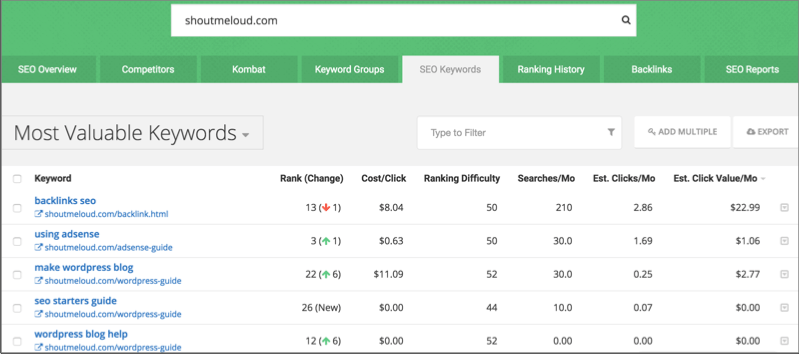
Here’s what you need to know about this one:
- Uses: SpyFu is highly useful for two important reasons.
- Understanding your competition’s SEO platform.
- Discovering under-served, un-tapped, or emerging markets.
- Features: SpyFu also has several modules.
- Compare Websites module
- Keyword History module
- Domain History module
- Related Keywords module
- Limitations: This program doesn’t have the depth of keywords that some competitors do, although this is changing. Also, the data for SpyFu is monthly, rather than real-time.
- Pricing: SpyFu offers two basic pricing plans as well as an “Agency” plan.
- The basic plans are $79 and $99 per month (with a discount of more than 40% if you buy a one year term).
- The “Agency” pricing is $999 per month.
SpyFu is a solid SEO product.
It’s useful if you want to check up on the competition as well as find new areas in which to market.
7. WordTracker

WordTracker is used by small businesses to research keywords, build new links, and develop a strategic SEO platform.
- Uses: The three main tools in WordTracker are the-
- Keyword Tool (which helps you research keywords)
- Link Builder (which identifies inbound link prospects)
- Strategizer (which takes a step back and looks at your entire SEO ranking strategy).
- Features: There are some features that are really cool here.
- The Link Builder tool is unique to WordTracker and are not found on any of the products on this list.
- The Strategizer gives you a kind of bird’s-eye view that you won’t get anywhere else.
- Limitations: WordTracker often gives fewer results than other services and the interface isn’t particularly intuitive.
- Pricing: WordTracker includes a 30-day free trial.
- Monthly pricing is $69 per month.
- Subscribe to a full year at $449.
I would not recommend you pick up all of the tools listed above, but instead stick to one or two and get used to its system.
If you have been using the Google Keyword Plaer tool for a while, you have a good basis for getting started with any of the paid and professional tools listed here. Take a look at some of these tools and decide which works best for your business strategy.
My recommendations:
- If you are looking for an easy, yet great solution, go for SEMRUSH.
- If you are researching keywords for micro-niche sites, choose a desktop tool (like LongTailPro) which is cheap and let you check keyword competitiveness.
Whatever you choose, use these tools to supercharge your SEO.
For more on SEO, check out:
Are you using one of the keyword research tools from the above list? How has your experience been so far? Share your thoughts in the Idea!
Did you find this guide useful? Share it with your friends on Facebook, Twitter, and Google Plus!
Subscribe on Youtube
Check your domain ranking
برچسب:
نویسنده: استخدام کار
Comment spam is the harsh reality and every green behind the ears, enthusiastic, unprepared blogger will be staggered by the sheer volume they receive of it. WordPress can help, but you need to mentally prepare yourself for the hard fact that more than 99% of the Idea you will receive is going to be spam. If you leave the issue unattended, the spam can quite literally overtake your site database and get you permanently baed from search engine index.
The first thing on your to-do list should be to prepare your website admin (backend) to help you deal with such massive amounts of bull. That’s where WordPress bloggers have an advantage. As much spam there is, there are quite a handful of powerful solutions, available free or for pocket-change-cost, to help stop and/or manage spam influx on your website.
Here are 7 top tools for stopping comment spam in WordPress. Take a look at:
1. Akismet
Availability: WordPress Plugin Directory and Akismet

Shipped free of cost with every WordPress install, Akismet is a staple because it’s WordPress through and through. This is the prima doa of all anti spam plugins available for WordPress.
Developed by Automattic, Akismet is pretty damn powerful. The enterprise grade spam prevention (and management) features are off the charts, some of which include a self-leaing spam detection algorithm (notes your ‘Idea marked as spam’ and uses it for automatic spam marking in future). The plugin also lets you put your Idea on Akismet server (where they undergo spam checks by the aforementioned algorithm). Comments that pass the inspection are published on your site’s front end, while the rest are marked spam and eventually deleted. All the Idea (spam or genuine) are maintained in logs that you can check at your leisure.
Akismet comes with up to 50k spam checks per month, only for non profits and personal blogs. Commercial websites can get the API key by subscribing at $5/month charge – a reasonable cost which is absolutely worth it.
2. WP-SpamShield Anti-Spam
Availability: WordPress Plugin Directory

WP-SpamShield Anti-Spam is featured right on top in ‘anti-spam plugin’ search results on WordPress.org Plugin Repository. It deserves the spot.
The plugin is absolutely free of cost and efficient to the last degree. It can tackle spam in Idea, registration/ sign up forms, trackbacks and pingbacks, etc. It can track and identify incessant spammers (based on IP) and let you blacklist the troublemakers to protect your site’s database from spam. It even has a JavaScript (cookie authentication) layer to help prevent spam from bots.
The plugin has nothing to do with Captcha or those lame ‘prove you are a human’ questions/ tick boxes. It automatically blocks proxy server users and supports every major WordPress form plugin.
It’s a smart plugin that costs nothing.
3. Anti-Spam Bee
Availability: WordPress Plugin Directory

With over a million active installs and counting and a glowing letter of recommendation from WordPress co-founder Matt Mullenweg himself, you can be sure you’re not wrong with Anti-spam Bee.
This plugin is free for all and super smart. It can take care of IP blacklisting (comment blocking), trackback validation, database optimization (a feature many people get by downloading a separate plugin like WP Sweep), and more. It shows you detailed monthly stats and spam activities in your admin dashboard and lets you ‘create’ your own spam detection algorithm by selecting certain indicators based on your knowledge of your user base.
Told you it’s an intelligent little beast. It’s also completely devoid of any aoying ads and complies with data privacy standards (Europe), which is another layer of icing on the freaking cake of awesomeness.
4. CleanTalk
Availability: WordPress Plugin Directory

This is one of the best premium online (cloud based) spam protection services available for WordPress.
CleanTalk prevents comment spam, registration/ sign up form spam, and trackback spam and uses smart algorithms to detect spam within ‘genuine’ looking Idea uploaded on the Clean Talk cloud. You also get detailed statistics and Idea log, along with automatic moderation (spam detection) activity and history.
The service is free for a 2 week trial period, after which you can continue to use and scale up the service with a measly $8/yr charges per domain.
5. WordPress Zero Spam
Availability: WordPress Plugin Directory

This is one of the simplest spam prevention plugins.
WordPress Zero Spam works by blocking Idea from users who don’t have JavaScript enabled on the browsers. It works with client and server side JS validation, which works to prevent most bots from spamming your Idea section.
It’s free of cost and superbly compatible with almost every major (and trusted) WordPress plugin (except Jetpack) and a whole variety of contact form plugins. Keep in mind that while it’s great against bots, it’s largely ineffectual against humans.
6. Growmap Anti Spambot Plugin (GASP)
Availability: WordPress Plugin Directory

Developers who hate the spambots with the intensity of thousand suns created Growmap Anti Spambot Plugin.
The GASP is simple: It adds a checkbox to your comment form asking your site visitors to check it to prove they are human. Since the box is generated using JavaScript on user’s own browsers, most bots won’t see it and fool the plugin.
It’s lightweight, effective, and free.
7. Stop Spammers Spam Prevention
Availability: WordPress Plugin Directory

This is a Jack-of-all-trades, multitasking plugin that can take a load off your head while dealing with comment spam.
Stop Spammers Spam Prevention blocks comment spam, sign up form spam, trackbacks, and contact form spam by passing them through a set of powerful and thorough algorithms. The plugin can block IPs from over 100 countries. It also gives a waing (Request Denied) page to the spammer (human and otherwise) promptly followed by a captcha: this second layer prevents spambots.
Conclusion
Here you are: the top 7 tools to protect your WordPress site from spam and prevent it from accumulating in your server and database in the first place. Keep your WordPress website clean and well maintained, and install one of these as soon as you get your website up and ruing.
Hand-picked articles for you:
Want to contribute an original article at ShoutMeLoud? Read our submission guidelines here.
Subscribe on Youtube
Check your domain ranking
برچسب:
نویسنده: استخدام کار
Optimizing images & using a CDN has become essential for online publishing.
A few days back, I talked about the best image compression WordPress plugins where I highlighted some great solutions for compressing images on your blog.
But not everyone is using the WordPress platform for their website. Many of us are blogging on various other platforms like BlogSpot, Tumblr, or something else.
What’s the best image compression solution for these users?
Well, this is where online image compression tools come into the picture.
When you search online for photo compressor tools, you will be awestruck by the sheer number of tools available. To make your work easier and save you some time, I’m listing some of my favorite tools that you can use right now to compress images & make them web-ready.
- (Note: A few of the listed tools also support compressing .pdf files which is useful for those who are selling eBooks online.)
Question: Why do you need to compress images?
The main reason is to lower down the loading time of your blog as this has a direct correlation with search engine ranking.
If your page takes more time to load, your competitor can outrank you based on similar quality content, but a faster loading time.
It’s important to note that having images on our blog posts are very useful useful as they improve the visual experience & make our content more media rich.
At the same time, to stop images from slowing down the loading time of our pages, we can use a few techniques:
- Compress images without losing quality.***
- Use high-quality hosting for your website.
- Use a Content Delivery Network.
When in doubt, you can use any of these page loading time testing tools to see how fast or slow your website is loading.
***In this article, we will talk about compressing images.
- Note: If you are using WordPress for ruing your blog or website, you should use one of these image compression plugins instead.
6 Best Online Tools for Compressing Images (without losing quality):

I love this one as the UI is very mode. It makes compressing images fun!
You can export compressed images using Dropbox or Google Drive. It supports the compression of 4 image formats:
- JPEG
- PNG
- GIF
- SVG
You will want to bookmark this for future use.
2. Kraken.io
This is one of my favorites as you can compress multiple files in one go.
Simply drag & drop.
What’s really cool here is that you can download all of the compressed files into a .zip file with single click.
I have been using it for a while & highly recommend it.
Below you can see the amount of data saved by the Kraken.io image compressor:

Images Compressed with Kraken (This image was also compressed with Kraken)
3. GiftOfSpeed .PNG Compressor || jpg compressor
When I was researching online image compression tools, I landed on the GiftofSpeed website.
This is one place which offers many tools that any webmaster can use to test various dimensions of their website.

This is another easy to use online image compressor site.
You should also use their image delivery tool to see if images on your blog posts or websites are well-optimized. It will also suggest things that you can do to further optimize your site.
Here is the result from one of my recent blog posts:

In my case, I always compress my images using ImageOptim (Free for Mac). At times, I run a batch image compression in WordPress using a plugin.
You should go to GiftofSpeed and take a test for your site to see how much KiB you can save by compressing images. This will give you a good idea of which image compressor tool/WordPress plugin you should be using.
4. Tinypng
This is one of the oldest & most well-known websites for compressing images online.

Tinypng also offers a WordPress plugin & a Magento extension that you can use to compress images without the hassle of manually uploading & compressing images on their website.
Supports:
- PNG
- JPG/JPEG
The free account lets you compress roughly 100 images/month.
To use this plugin you need to get an API key from here.
5. OptimiZilla
I really like this one as you can compress an image based on your desired level of quality.
The instant preview lets you compare your original image to your compressed image & you can set your desired compression level from this preview.
This is useful when you are compressing a huge image & want a way to control quality loss.

It uses the best optimization and lossy compression algorithms to shrink JPEG and PNG images to the minimum possible size while keeping the required level of quality.
- It supports bulk upload & bulk compression.
- You can upload up to 20 images.
(You should also know about OptimiZilla’s sister converting site called Toepub. This lets you convert .pdf files into various formats for free. eBook authors will find Toepub very useful.)
6. ImageRecycle

This is another great image & .pdf compression tool.
You can use its online compressor tool for free and developers can use its API to build their own compression tool.
It supports multiple CMSs using their API. Right now, they have a WordPress plugin, Shopify app, Joomla Extension, and a Magento extension.
You can create a 14-day free trial with a 100 MB quota.
They also have an interesting offer for bloggers who can write about their service in order to get 2 months of access with a 3GB quota. I believe 3GB is good enough for many of you to compress all of the images in your media library.
Over to you:
These are some of my favorite online web apps to compress images without losing quality.
I seldom use them for projects which are not related to WordPress or blogging, but you can use them however you like.
Now, it’s your tu to contribute. Let us know your favorite image optimization tools in the Idea section below.
If you’ve enjoyed leaing about these tools, show your love by sharing this post on Facebook & Twitter.
Here are some hand-picked articles to help you get more out of your images:
Subscribe on Youtube
Check your domain ranking
برچسب:
نویسنده: استخدام کار

With SEO getting difficult, inteet marketing professionals have tued to SMO.
Today, SMO (social media optimization) is the most reliable way to drive traffic to a website.
Ask any experienced social media marketer:
- What works best in the world of social media?
And the response will always be:
- Good content.
We are getting back to the good old days, when “content was the king”.
When you think of social media promotion, the first names that come to mind are probably Facebook, Twitter, LinkedIn, Pinterest, and Instagram.
When I started a blog on startups and small business advice, I wanted to find a medium where I could use my writing skills to drive traffic to my website.
I am not on Facebook and I only use LinkedIn once in a while. But occasionally using LinkedIn doesn’t leave me with many options to promote my website.
How I discovered Quora:
This is when I stumbled upon Quora.
In fact, writing on Quora happened by accident.
I was searching for a few answers to some business related questions on Google.
Most of the questions I searched for were long tail keywords.
Quora links came at the top of every question I typed into Google.
I clicked on a few of these links. The information provided by Quora users was informative and precise.
Most importantly, the variety of answers provided me with a different perspective to my questions.
I studied the platform a little more.
The next day, I was on Quora.
What is Quora?
Quora is a simple Q & A website. It’s like Yahoo answers but with a better interface and integrated gamification to keep Quorans more active.
Here are a few statistics about Quora:
- As per Alexa, Quora’s world rank is 108 (it ranks 13th in India).
- Quora currently has close to 4.6 million registered users.
- Quora reaches over 2.1 million people in the USA alone.
My initial days on Quora:
Despite my love for writing, sometimes I really need to persuade myself to write something.
I also hated to research or inform myself before writing (a very bad habit which hurt my strategy on Quora).
So I started writing my thoughts down on Quora for a few questions.
The responses to my answers were tepid mostly because they were all half-baked answers written with no enthusiasm.
I needed to rework my strategy.
Finally, after a few weeks of religious writing on Quora, I hit success.
My first success was an answer I wrote on Patanjali FMCG Products.

The answer got 13.2 K views and was featured in Quora’s digest.
Since then, I have had quite a few answers featured in Quora’s digest which brings a consistent amount of traffic to my blog.
How to start driving traffic from Quora without spamming:
- Set up the right profile:
Quora gives you the option to setup your tagline, your areas of interest, and a short bio.
Your tagline says a lot about what you do and why you are on Quora. Don’t overlook this.
The platform is for exchanging information. A wrong tagline will confuse users and you will never get you any traffic to your website.
You can use your website’s link as a tag or use “pipes” between small phrases as a tagline (see my profile below).
Important: If your answers go viral, you can expect a lot of users to visit your profile. A wrong profile will not lead them anywhere. Think of your profile page as a landing page for your website. You do not want precious traffic to go to waste.
Here is how my profile looks on Quora:

As you can see, I have used my blog’s link in my profile’s tagline.
(Note: The “Highlights” section shows the number of categories you’re featured in as a top writer. The other sections are self-explanatory.)
Once you have written about yourself, you have to setup your categories/interests.
To get the right questions to appear on your feed (similar to Facebook’s wall), subscribe to the categories you want to read and write about.
I subscribe to the following categories:
- Entrepreneurship
- Startup Ideas
- Startups
- Startup Advice
- etc.
Recently, I met someone who was getting a completely wrong feed from Quora. The problem was the person had subscribed to irrelevant categories.
You need to be with the right categories to get the right questions and answers to appear on your feed.
- Find the right questions to answer:
Once your profile is properly set up, your Quora feed will show the popular questions asked in the categories you’re subscribed to.
The feed also shows answers from the users who you follow and their subsequent feeds.
You can also go inside the categories and look for questions.
While selecting a question to answer, here is what you need to do:
- Look for questions in your area of interest where you can provide “value” to the existing answers.
Do not write answers to questions in topics you are clueless about.
A bad quality answer will collapse your answer.
I see a lot of answers written only with the intent of promoting their website. This is bad taste.
Avoid the trap of “easy promotions”:
- Focus on A2A (asked to answer). As you gain popularity, you will get a lot of A2As. Try answering the relevant ones to build a base of loyal followers on Quora.
- Comment on answers written by others. I do not consider the Idea as directly answering a question. Even so, you are contributing to other answers.
- Write interesting answers:
Observe the type of questions asked and the types of answers provided.
Do not get overwhelmed with answers written by some of the best names in your line of work.
As they say:
- “Lea from the experts”.
Quora gives you an opportunity to lea from them first hand by reading what their views are. You can try to emulate their style of writing or you can write in your own style.
But it takes a lot of practice to form your own style of writing.
Here is the writing style I follow:
- I write in categories I am confident about (e.g. startup advice, entrepreneurship, etc.).
- I research my answers well before writing.
- I use bullet points to divide my answers into simple points.
- I use images, quotes, statistics, past stories/case studies to give my answers depth.
Do not answer a question just for the sake of answering a question. You need to have a passion for writing informative answers.
Only answer the questions in your areas of interest. If you don’t, not only will your answer get down-voted, you will waste precious amounts of time framing answers no one will read.
Again, writing in an area you do not have any expertise on will be a waste of time and energy. You might be the best “Guru” in the town, but you won’t get any views if your answers are not genuine.
You have to understand the question, research the topic (if you need stats), and then write the answer.
Also, do not write single line “words of wisdom”. You might be the wittiest person on earth, but demystifying your wittiness is not why everyone is on Quora.
Answering questions in the right way also increases your knowledge base.
For example, I research before writing on Quora to back my thoughts with statistics or real life examples.
(As a side bonus, working with Quora in this way has improved my writing skills.)
In short, when your answers are high-quality, interesting, and informative, a couple things happen:
- You get traffic to your website.
- You are helping to build a better ecosystem of information exchange by helping others.
- Promoting your website, the “right way”:
I see so many answers with direct links posted to websites.
Blatant shameless promotion is the most hated medium of promotion.
Lines like:
- “READ the following article to get an answer to your question.”
- “Read my blog : ____”
- “You can find the answer over on my website ____.”
These kinds of responses will get you little to no traffic from Quora.
Here is an example of a spam answer written by someone:

The answer collapsed. I am sure the user was also marked as spam by the Quora moderation team.
The right method of getting traffic is by writing an awesome answer with sincere effort and then sharing a link at the end of the answer.
I am able to drive a considerable amount of traffic to my startup blog through Quora and I do not shamelessly advertise.
Once you write good answers, you convince Quorans about your credentials in the category you are writing about.
I use lines like:
- “I share similar views at ‘My Blog Name’.”
- “I provide similar startup advice at ____.”
Believe me. 8 out of 10 times, readers from my answers will come to my blog.
Here’s the method to getting Quora traffic:
- You write an awesome, well-researched answer.
- The answer establishes your authority as a knowledgeable person in the topic.
- At the end of the answer, you give your blog’s link.
I see no reason why users would not want to visit your website.
Once you are an established name in your field, you can use your website’s links in your answers as a point of reference.
But do not self-promote.
Quorans hate self-promotions.
They will down vote your questions.
Here are few more quick tips on how to use Quora effectively:
- You can use different taglines for answering questions in different categories. The tagline shows next to your profile. You can be witty while selecting taglines.
- You can merge questions you have answered earlier.
- Write with the aim to help others. If your answer is good, you will drive users to your website. Everyone who reads your answer will be wanting to know more about the user behind the answer which has gone viral.
- Leave the sarcasm at home. Quorans might like sarcasm, but only in a good way.
- Don’t focus on followers. The platform is not Twitter or Facebook where you want followers. I currently have 246 followers and have never felt the need to have more followers for getting more views. In fact, my first answer went viral when I had less than 50 followers.
- Google analytics does not show you the traffic received from Quora. Try Google’s link shortener to generate shortened links. You can view the clicks on shortened links through Google’s URL shortener reports (attached to your Gmail account).
- Keep track of the notifications sent by Quora. The notifications provide you information about A2As, your answers getting featured in Quora’s digest, users following you, or you being featured as a top writer in a certain category.
- Look at the popularity of questions you plan to answer. Spend some time in finding the statistics of a question. Ensure the question has enough followers and views. You do not want to spend time answering a question which has no readers.
- Asking a question and then answering that question is another strategy to drive a good amount of traffic to your blog. I recently asked a question “What is the dark side of being an entrepreneur?” The question currently has 187,000 views. My answer (to my own question) helped me get a good amount of traffic (and a few new subscribers) to my blog.
- Keep track of your progress on the website by checking your statistics.
Here is a snapshot of my Quora statistics:
- The list of answers is sorted based on the amount of views your answer received.
- The graph on the right shows the total views and number of upvotes your answers received.

As you can see, my answers have been interesting to many readers. This interest drives a considerable amount of users to my blog.
If you are struggling to get readership, views, and subscribers for your blog, you need to go where the traffic is. And if you aren’t on Quora, you’re missing out on one of the best sources of high-quality traffic on the inteet.
- (Also remember, some of the best brains in business are on Quora like the founder of Wikipedia (…and Aston Kutcher). Now imagine one of them answering your question. You might never get a chance to meet the famous personality, but you can ask them a question on Quora.)
Quora is the future of ethical content marketing.
It’s the place to be for people who love to write.
And it’s a great way to drive traffic.
Do let me know what other methods you are using to drive traffic from Quora in the Idea below.
Subscribe on Youtube
Check your domain ranking
برچسب:
نویسنده: استخدام کار
Is your business lacking sales due to the absence of a good writer? A good writer who can update your blog or write sales copies to convert traffic into the leads?
Well, you are not alone in this quest of finding a good writer. Most of the online businesses often are in search of good writers.
Having an engaging content on the website or blog has become the need of the hour for businesses. Here we are not talking about just any content, but high quality and user engaging content written by proficient writers. There are several sources you can tap into, for finding content writers for your business. However, before we look into these sources, first you should understand some of the basic qualities of a good writer.
Which qualities to look out for in a good writer

- Proficiency – The writer should be proficient at their craft and must have the ability to create creative and convincing write-ups that can produce positive results for you. After all, you want everything on your business to be result oriented. Don’t you?
- Efficiency – A competent professional writer does not only free up your time so that you can concentrate on other matters of business, but also ensure that the work is done in a timely maer. On the other hand, an inexperienced writer will become a liability and distract you from doing your work, which is more crucial.
- Creativity – A creative writer can tu a good idea into an excellent one. He will add the creative quotient to the data available and bake it in such a way that will make it stand out in the noise. This will result in more people reading it and responding to it.
- Productivity – A productive writer offers value for money and brings in better retus. A most productive writer may not always be the one who charges the lowest fees, but the one who produces the greatest retu on investment.
- Reliability – A reliable writer is the one on which you can rely to deliver top‐quality products in a timely maer. When a deadline is at stake the reliability of the writer comes in handy.
Now that we have looked at the qualities that you should look out for, while searching for a good writer, let us put some light on how and where you can find such a writer.
How to find a good content writer

- Look In-House First: Often there is hidden talent in every organization just waiting to be nurtured. Writing is an area, which does not require any special skill set. A programmer, designer or even a manager can be a good writer. This is why it is always advised to look in-house. You can start by surveying your company resources and find out someone who would be interested in taking upon the new role.
- Search for freelancers who write the content you want: If you are not looking to hire someone full time for the job, the other best possible solution would be searching for freelancers on a writer’s marketplace. You not only get a wide array of enthusiastic professionals but can also access their past work to get an idea of their credence. Here is a list of websites to find writers for your online business.
- Search via social media: Another popular way to find good writers is via social media. Nowadays, most of the professionals are on social media, engaging with business contacts. Social media platforms like Twitter, LinkedIn, Google+, Quora etc. Offer a viable solution where you can easily find competent writers.
- Social advertising: If you do not want to spend a lot of time search for a particular writer, you can opt for social advertising. By doing so, you can have your ads only seen by freelance writers, which is highly beneficial.
Overall, it is not a rocket science to find a good writer these days. With multiple options available as discussed above, finding a good writer is just a walk in the park. However, always ensure to properly analyze the writers beforehand and check their credence.
Let us know your experience of finding & recruiting a writer for your business? Sharing your experience would help many of us to lea from your success & failures.
Want to contribute an original article at ShoutMeLoud? Read our submission guidelines here.
Subscribe on Youtube
Check your domain ranking
برچسب:
نویسنده: استخدام کار

In digital marketing, social media presence plays a key role.
For businesses, it is very important to manage multiple social media accounts and monitor their activities.
SocioBoard, the open-source social media management tool, makes all this work easier for digital marketers. Being an open source tool, it will likely come up with even more brilliant features in the near future.
Starting from a free “basic” plan to an expert-level “platinum” plan, SocioBoard offers its services to many SMBs and entrepreneurs. This beautiful tool suite offers flexible social media services and precise analytics to marketers and helps them with the growth of their business.
Let’s have a look at the overview of SocioBoard’s features that make complicated social media management simpler.
Social Networks Supported:
- Google+
- Tumblr
- YouTube
- …and Google Analytics

Features of SocioBoard: Social Media Management Platform
The features of SocioBoard meet the basic requirements of social media marketers. That is, marketers can manage multiple social accounts and automate their activities. SocioBoard also offers additional features that can boost your social campaigns.
Here are the features of SocioBoard:
- Messages
The message feature contains four options in its drop-down list. They are:
- Smart Inbox
- Inbox Message
- My Tasks
- Sent Messages
There is also a filter on the right side of the dashboard. With this filter, you can select the already added social profiles and add some other accounts as well.
-Smart Inbox:
With “Smart Inbox”, SocioBoard gives you an alert whenever an action is done on one of your social profiles. For example, when someone follows you on Twitter, you will get a message stating that someone started following you.
You’ll also receive the follower’s data like their follower and following count as well as their bio. This is what that looks like:

You can get these messages for notifications, retweets, @mentions, and new followers. You can manage these messages and profiles in the filter.
-Inbox Message:
This is the normal inbox where you can see the direct messages you receive on various social media profiles. In the filter, you can select which social accounts to view/add new accounts.
-My Tasks:
Working as a team is the driving factor of an organization. With the “My Tasks” feature, you can assign and schedule tasks to your team members.

On the right side of the dashboard, you can see the “Manage Tasks” tool, where you can see “My Task”, “Team Task”, “Completed Task”, and “Pending Task”.
This is helpful to see only the tasks you want to see on the dashboard for a specific social media account.
-Sent Messages:
This shows you all of the sent messages from the selected accounts. You can manage the accounts through the filter located on the right side of the dashboard.
- Feeds

The drop-down list of this feature contains the list of all social networks that are supported (e.g. Facebook, Twitter, Instagram, etc.) Under each platform, you can see the accounts that were added. You can select an account and see the feed on the wall of that account.
In the above pic, you can see that we’ve selected a Twitter account. So, the news feed and Tweets of that account are shown.
Like this, you can see whatever feeds you want to see. The switching process is very simple.
- Publishing
Publishing is an important part of social media marketing.
You have to maintain good customer relations. You should do small things like wishing your customers a happy birthday or a happy (some other day).
You can schedule this task and save a lot of time. The drop-down list of this menu contains:
- Schedule Messages
- SocioQueue
- Drafts
-Schedule Messages:
With this feature, you can schedule your messages and send them to multiple users at one time. It gives you a huge text space of 5000 characters, so you can compose a detailed message.
On the top-right coer of the tab, you can select the social profiles to which you want to send the message.
You can schedule the message now or you can save it to drafts and schedule it later.
-SocioQueue:

In the SocioQueue, you can see all of the messages that are scheduled.
You can get complete details like the text of the message, who the message was scheduled to, and what the status is. You can search for messages using the search bar.
If you want to delete or edit a message, you can easily do this from here.
-Drafts:
You can see the messages that are set as drafts by you. You can schedule them to be sent whenever you want.
- Discovery
Marketers should always expand their social community. So searching for targeted users is an unavoidable task.

With “Discovery”, you can search for users based on a keyword. SocioBoard enables you to make this search from a single window so you do not need to switch platforms.

You can also see the search history. Here, you can make and refine the perfect search with different keywords.
- Reports
Measuring your social media performance is an important thing which enables you to come up with efficient strategies.
SocioBoard gives you deep insights into your social media activities. You can see individual reports like Facebook reports, Twitter reports, and combined group reports.

In Facebook reports, you can see things like demographics of your followers, what kind of content works best for you, who is sharing your content, etc.

With Twitter reports, you get to know the engagement stats, follower count, amount of new followers in a certain period of time, how many retweets you got, who your top five followers are, etc.

- Shareathon
This is really cool.
Here, you can attach a link to a webpage (website/social media page) and fetch content from that link whenever a new post published. Then you can post it onto your selected social groups or pages.
When you click on the “Actions” button, you can see the option for “Add Shareathon”. By clicking on it, you can add the source of the content.
-Page Shareathon:

With this feature, you can post on multiple pages at a time.
-Group Shareathon:

With this feature, you can post on multiple groups at a time.
- Automated RSS Feeds
When you want to add the RSS feed of a website, you can make this process automated.
With the “Automated RSS Feeds” feature of SocioBoard, you can automatically post the desired RSS feed on your desired social media accounts.

As shown in the above pic, you can paste the URL for the RSS feed and then add in the social accounts that you want. Clicking on the “Add RSS Data” button, you can post the content on your selected profiles.
- Sentiment Analysis

With this feature, you can get to know the response of the social media users for your social pages.
When someone mentions your name in their posts, or retweets your tweet, you can see the response of the users for that post.
You can select the profiles and the type of the messages for which the sentiment analysis should be shown.
- E-Wallet

Just like any other wallet, you can maintain cash and make purchases through SocioBoard’s E-Wallet.
You can add money to the wallet by clicking on the “Add Money to Wallet” button. You can also receive from and send cash to others while ultimately transferring the wallet money to your bank account.
- Affiliates

This is a promotional feature of SocioBoard.
You can invite your friends to join SocioBoard through an invitation link. When you click on the “Show Public URL” button on this feature’s dashboard, you can get the invitation link.
By sending this link to your friends, you can invite them to join SocioBoard.
But, what’s the benefit for you?
Whenever a user joins through your link, you will be getting a commission sent to your wallet. Whenever they make a transaction on SocioBoard, there will be some extra commissions for you.
11. BoardMe

Generating quality and relevant content for social media accounts are important and usually, somewhat hectic.
But with the BoardMe feature of SocioBoard, you can easily search for relevant content from a single dashboard.

Hovering on the “Actions” button, you can see the “Add a Board” option. Clicking on it, you can create a board where you can add hashtags or names of social profiles.
Once you add the board, you can get content from any social network or webpage in which the hashtag or name is used.
About the UI:
The user interface of SocioBoard looks cool. The navigation of this tool is user-friendly. The main menu is located on the left-hand side of the dashboard. You can manage all of the essential things like Publishing, Messaging, Discovering, and Analyzing from a single window.
The moment you log in, you can see the summary of all your social media accounts on the dashboard. From here, you can easily decide your next steps.
Wrapping Words:
For SMBs, the cost of a tool matters. But beyond the cost, they want good features as well.
SocioBoard is the best choice for marketers who want better services at a better price. The new features of SocioBoard like Smart Inbox and Shareathon are the best-in-class features.
Every minute is important for marketers and these features are very helpful in this regard. In any aspect, SocioBoard is a great choice for SMBs and entrepreneurs.
Subscribe on Youtube
Check your domain ranking
برچسب:
نویسنده: استخدام کار
For me, traveling is freedom.
If you are a travel blogger, I give you a standing ovation. Being a digital nomad, I understand how tough it is to blog while traveling. I also know that it’s even tougher to monetize your travel blog.
There are many travel bloggers who often get sponsorship for traveling (like free trips with all expenses covered), but not everyone is so lucky at the begiing of their blogging career.
Travel blogging is a popular & profitable niche that can generate great amounts of revenue using various monetization methods.
Some of the most popular monetization methods are:
*** Today I will be telling you about some of the best affiliate programs that you can use for your travel blog to ea money.
This is a one of a kind list of affiliate programs & I hope you make the most out of it.
- If you are new to affiliate marketing & don’t know how to make money using it, you can lea here.
If you are already well-versed in the art of affiliate marketing, then read on for the complete list of affiliate programs for travel blogs.
Best Travel Affiliate Programs to Quadruple Your Blog Income:
1. Booking.com Affiliate Program
Booking.com is a popular name in the travel industry.
They also have an affiliate partner program that is open for anyone with a blog/website, an app, or a travel agency. As long as you can offer the best choice of accommodations, this program is for you.
Highlights:
- Free & easy sign-up process.
- Offers search box, deep linking, and baer integration options.
- They have an offer-based, commission split model.

Join Booking.com affiliate program here.
2. TripAdvisor Affiliate Program
When someone is plaing a trip, they usually check out TripAdvisor for reviews, recommendations, and bookings.
Getting on this affiliate program will be valuable as you can source content from their website and link your readers back to the original content through your tracking link.
Highlights:
- 50% commission.
- Deep linking to over 500,000 cities & hotels.
- Tiered commission structure.
- Monthly payout.
Join TripAdvisor affiliate program here.
With over a quarter million properties, Agoda definitely deserves to be in this mega list of travel blog affiliate programs.
Their in-house affiliate program is open for everyone to join (but it’s mandatory to have a website/blog).
The approval is a manual process & takes about 48-72 hours.
Highlights:
- Up to 60% commission on margin.
- Offers search box, text links & data feeds.
- Use hotel power ads to increase your revenue by 3x.
- Minimum payout $200.
- Payout mode is direct bank transfer.
Apply for Agoda affiliate program here.
Note: Agoda’s affiliate program can also be joined using ShareASale.
Skyscaer is one website that I always use when checking the price of a flight.
If you have never used them, you should download their mobile app & I promise you won’t be disappointed.
For your travel blog, Skyscaer offers various options. The one that you might want to start with is the Travel Widget.

You can use this widget in your sidebar or around the content where you are more likely to have users take an action. This widget will redirect them to the Skyscaer site.
If you want to take it to the next level, you can hire a developer & use the Skyscaer travel API to build your own search functionality on your website or mobile app.
Highlights:
- Offers white-label solutions for offering flight searches on your website.
- One of the most popular travel affiliate program APIs.
- Flight booking widget for your sidebar.
- One of the best & most detailed reference systems to help you get started.
- Supports flight bookings, hotel bookings, and rental cars.
Join Skyscaer affiliate program here.

Referral programs & affiliate programs are two sides of the same coin.
In a referral program, instead of eaing hard cash, you ea points (or other non-monetary value) which you can utilize to buy products on the same network.
Here is an infographic from Refferalcandy that explains the differences & similarities:

AirB&B has a very popular referral program that helps you to ea decent “money” by referring other users.
You can ea up to $72 for every successful referral & a maximum of $5,000 USD travel credit per account.
Highlights:
- Easy to share referral link as user will also get AirB&B credits worth $18.
- Well known name in the travel industry.
- Good for travel income.
Join AirB&B referral program here
Note: You might want to have a look at other popular apps (such as Lyft, Uber, HotelsTonight) which also offer referral programs.
6. ShareASale
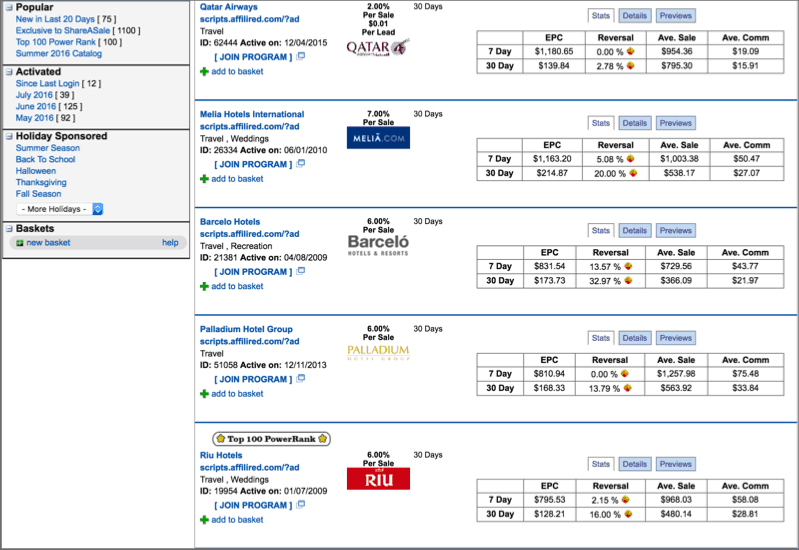
ShareASale is an affiliate marketplace where you can find top affiliate programs in any niche.
Many of the popular travel airlines, hotels, and services (such as Qatar Airways, Agoda, The Lalit Hotels, Riu Hotels, etc.) are available via ShareASale.
If you have never used ShareASale before, the navigation may be confusing at the begiing.
We have created a detailed training video of ShareAsale & a few other popular affiliate marketplaces at ShoutUniversity.
(You can join ShoutUniversity here.)
Highlights:
- Payment via direct bank deposit.
- Easier to reach minimum payout than in-house affiliate programs.
- See the top performing affiliate programs in every niche.
Join ShareASale affiliate marketplace here.

Whenever I research or compile an exclusive niche-based affiliate program list like this, it is always incomplete without Amazon’s affiliate program.
Amazon is the top destination for online buying. They have an amazing reputation and will help you ea great amounts of money in no time.
Once you join the Amazon Associates program, you can link to any of the products listed on Amazon & ea money across the entire site.
What’s really cool about the Amazon affiliate program is you will ea money whenever a referred user purchases any product from Amazon. That is, it doesn’t just have to be the product you sent them to.
Highlights:
- Highly reputed network.
- Getting started is easy and you will find tons of guides & videos.
- Numerous products related to travelers & traveling.
- Higher commission as you start referring more users.
Join Amazon affiliate program here.
Tip: If you find it time-consuming to create links for individual products, you can use Viglink to make the process easier. You can lea more about Viglink here & join here.

With Dohop you can start your own flight & hotel booking website.
They offer white-label solutions where you can also customize the look & feel of your site. You can create a page on your blog for flight bookings & use the widget created by Dohop to make it look like your own offering.
This easy tweak will help you a lot in branding & make you look more authoritative than you are now.
You can see an example of a widget here that I created within 5 minutes.
Highlights:
- Affiliate friendly.
- Easy to get started.
- White-label solution.
- Payout via PayPal & direct bank transfer.
- Minimum payout is EUR 300.
- Get paid in USD, GBP, DKK, NOK, SEK, and ISK.
Join Dohop affiliate program here.
Other popular travel website & services offering affiliate programs:
If you have not joined any of the above listed travel affiliate programs, then you should do that right now.
This list is currently up to date, but to make it complete, it requires your contribution!
Do let us know of any other popular affiliate programs for the travel niche that you would recommend to other travel bloggers.
I look forward to reading your tips & insightful ideas in the Idea section below.
If you find this list worthy, do share it on your favorite social networking sites!
Subscribe on Youtube
Check your domain ranking
برچسب:
نویسنده: استخدام کار

As we were landing into the mid of an year, like everybody else, I retrospected and reevaluated my last year’s jouey. I thought it’s the perfect time to start making the changes which I thought of doing few weeks back or last month or last year. When I brooded about what is that one habit which I want to improve upon and change is, the only thing which came into my mind was to stop complaining.
As mindful I strive to be with my words, I always used to end up complaining, be it the weather, job, clothes, relationships, worldly situations, traffic, high prices etc..The list goes on. Have you ever thought of the amount of time you complain in a day.
The thing is we have made ourselves so miserable that we end up finding fault and blaming others for our current situation. Think about it: Has complaining solved any of your problems?
When we complain about things to our family. friends or spouse, we only bring negative energy into our lives. The energy which we invest in complaining if invested in doing something positive, will transform our life and make it happier.
So this year, I challenged myself to stop complaining and see what happens. I knew that complaining is a habit and it will take a little time to break it but one thing was for sure, habit can be broken with will power and consistency.
Well, it’s been 2 months that I have been practicing the art to not complaining and guess what, I have been pretty successful. Of course, I caot say that I never did complain in past 2 months. I did a few times but I think it’s ok as I am still on the path to break a bad habit and inculcate a good one.
Things that I did in order to stop complaining:
1.Express gratitude:
Often I have found myself worrying about things which I don’t have rather than focusing on things which I have. This year I decided to say more of phrases like “Thank You”, “I appreciate your help, “Congratulations” or simply just acknowledging the fact the “how lucky I am to be alive”. Of course, it did take a little time to do it sub-consciously, therefore, I started setting micro-goals instead of macro goals. Every moing, I used to be thankful of what I have and reminded myself to be better than the previous day thus slowly building the habit.
Read: Do These 5 Things & You Will Be Ahead of 99% Of The Population
2. Change perspective:
Everyone has their own story, their own way of looking towards life. By simply accepting this fact, you will notice that you are more open to people, to life and you will open up possibilities for you which you never thought of. It’s not necessary to agree with the other person but you can always appreciate and accept his thoughts and values. You caot change somebody else’s attitude and perspective but you can change yours.
I have always had a strong stand on what I believed in and what I stand for, which of course led to clashes with people around me. So, I promised myself that I will listen to people more and try to understand their perspective. I must say, in past 2 months, I have been able to look at the world with endless possibilities and it has widened my horizon.
One thing which I have leat in past 2 months is: It’s not necessary to agree with the other person but you can always appreciate and accept his thoughts and values. You caot change somebody else’s attitude and perspective but you can change yours.

3. Change complaints into solutions:
This is the most important point which I followed. Whenever I used to see myself complaining about anything, I would ask myself what can I do to change the situation. If I didn’t have a solution, accepting the thing the way it is killed l the urge to complain. For example instead of complaining that it’s cold outside and I hate living in this place, I used to stuff myself with woolens so that I feel warm and cozy. Use complaints as a catalyst for positive change and positive actions. It will bring peace and happiness into your life rather than frustration.
Use complaints as a catalyst for positive change and positive actions. It will bring peace and happiness into your life rather than frustration.

4. Dissociation from people who complain too much:
Constantly listening to people who are angry, frustrated and complain too much about family, life, situations only adds negative energy into your life. It’s very important to draw a boundary line in your life and surround yourselves with people who are cheerful, grateful and appreciative of life.
In past months, I have distanced myself from people who complain a lot. It’s not that I did not met or talk to them at all but yes, I did not indulge myself when people around me started whining. I distance myself from that conversation. Doing this has brought a very positive spark to my life. I feel vibrant and full of positive energy.
5. Notice how often you complain:
Simply by being consciously aware of what we say, we can notice how often we complain and what about? I started noticing when do I complain? Do I complain during a particular time, situation or around particular people. Whatever was the case, I followed all the above points and tried to live my life to the fullest.
6. Practice Meditation & Yoga:
Yoga is a positive way of life which helps you to be stress-free, healthy and happy. It strengthens positive mental attitude, develops focus, concentration and increases flexibility. It makes you feel alive and helps to know your true self. Yoga along with meditation will help you chu out all the negative thoughts and emotions and you will feel more coected to yourself and to the world around you.
I started practicing yoga and meditation. However, I couldn’t do it regularly as I have always run away from exercising. I am still trying to improve on this particular point.

One thing which I can say for sure after 2 months is it has changed my life for better. I feel very happy and energized from inside. Of course, it will be impossible to wake up the next moing and completely stop complaining but by being mindful of what we say, we can slowly change the habit and be more happy and present in now. Never forget that life is all about perspective.
Of course, It wasn’t like I woke up the next moing and completely stopped complaining but by being mindful of what we say, we can slowly change the habit and be more happy and present in now. Never forget that life is all about perspective.
Try it for a week and let me know how has it changed your life?
Subscribe on Youtube
Check your domain ranking
برچسب:
نویسنده: استخدام کار

Blogging is the art of sharing knowledge with the world.
In today’s era, there are many people who are in the blogging field. Some of them are doing well, whereas some are not. There are multiple reasons why some people are doing better than others in this field. One of the main reasons is the overall strategy of the blogger in order to fetch more readers and more user engagement.
One such strategy is giveaways.
Yes, you read that correctly. Giveaways are one of the best ways to increase user engagement with your blog. With giveaways, you can reward your readers and promote your brand on a large scale. You should read about how A Free Contest On Your Blog Will Increase Readership.
There are many bloggers who arrange giveaways on a regular basis. Some bloggers are able to get a lot out of them, whereas some are not. The main reason behind the success of any giveaway is how it was arranged.
If you have arranged it properly, then the chances are high that it will be successful.
There are many tools to run successful giveaways.
One such tool is Rafflecopter.
In this post, I am going to tell you how you can run your giveaways using the Rafflecopter tool.
Why do I recommend Rafflecopter to run giveaways?
The main reason why I like Rafflecoper is because of its usability.
Rafflecopter is a very easy way for you to create and manage giveaways. It is also very easy for users to enter into your giveaway.
You can easily set up pre-defined tasks for users such as sharing content on social platforms, joining a comment list, and so on.
You don’t need to edit any code or install any plugin. It’s a very simple, intuitive, and powerful tool.
How to run giveaways using Rafflecopter?
First, you need to sign up with Rafflecopter.
There are two accounts to choose from. The first account is the free account and the second account is the business account (paid). While there are many more features available in the business account, if you caot afford it or don’t need it, the free option also has all of the necessary features for ruing a successful giveaway campaign.
Once you’re signed up for Rafflecopter, you will be taken to the Rafflecopter dashboard. The dashboard is where you will create your Rafflecopter giveaways.
- Click on “New Giveaway”.

- On the next page, set the name for your giveaway.
(Make sure you set a catchy name for your giveaway.)
- Next you need to add your prices. In the free account, you caot add an image for your price, but it’s OK, you don’t need to.
Tip: Make sure you add the prices according to your audience’s needs and requirements. This way, more and more people can participate in your giveaways.

- Now it’s time to set the conditions by which the user can enter into the giveaway.
You can create your own task such as liking a Facebook page, tweeting a message on Twitter, following on Twitter, subscribing to your email list, etc.
You can also give out points for each task. Points range from 0 to 5.
You can even tell the user if any of the tasks are compulsory or not.

There are some tasks which you can add in the business account that you can’t add in the free account. Let me quickly show you the difference.
In the free account, you can set the following tasks for users:
- Tweet a message with a blog URL or a giveaway URL.
- Liking a Facebook Page.
- Following your account on Twitter.
- Commenting on your blog post.
- You can also create your own task such as having a user answer some questions.
In the paid account, you can also do the following:
- Create a poll.
- Get a user to sign up to your email list. (MailChimp, Aweber, etc.)
- You can tell the user to “pin” an image or follow you on Pinterest.
After you have defined the conditions of the giveaway, you just need to enter the duration.
I recommend you set the duration for 7 to 10 days. The goal is to maximize the richness of the giveaway, so a longer duration has a better chance of users telling their networks about it.
But you should set the duration according to your individual needs.

Add widgets in WordPress to display giveaways using Rafflecopter:
Now, you can add some widgets in WordPress to display the giveaway which you have created. Rafflecopter will give you a code which you will need to add into WordPress.
To display the giveaway in a post, just add a “New Post” from the WordPress admin area and paste the code of Rafflecopter in the text mode of the post box.
Once you paste the code, your widget will be displayed in the post.

If you want to change anything in the widget, you can do it via your Rafflecopter dashboard.
You don’t need to edit any code for that; the code will automatically update for you.
Now you just need to promote your giveaway as much as you can. For that, you can use various hacks like social media promotion, sending out newsletters, boosting your posts, etc.
The more you promote the giveaway, the more likes, tweets, subscribers, and users you will acquire.
So promote it well and you will surely get a lot out of it.
Create an account on Rafflecopter
Over To You
As a blogger or webmaster, you need to reach those users who are willing to visit your website/blog again.
Giveaways provide you with a great way to do this. If you arrange giveaways properly, then believe me, you can do wonders with them.
There are many great examples of giveaways from bloggers who have driven huge amounts of traffic to their blogs. You can also do the same with your giveaways using Rafflecopter.
Read:
If you have created any giveaways using Rafflecopter in the past, then let me know the results via the Idea. Or did this post encourage you to give Rafflecopter a try? Also let me know how it goes in the Idea below.
If you like this article, do share it with your friends!
Subscribe on Youtube
Check your domain ranking
برچسب:
نویسنده: استخدام کار

If you are ruing a tutorial blog or a blog where you write evergreen content, there is no reason that you should stop promoting your old articles.
I have already shared tips to promote old blog posts, and today I will be talking about one WordPress plugin, which will help you in social media promotion of old blog posts.
Revive old post is a free WordPress plugin which supports Facebook, Twitter, LinkedIn and will automatically share your old posts on these networks.
I have already talked about the importance of tweeting your posts multiple time, and we will be taking the same approach here, but for an indefinite time.
We will be looking at tweet old posts WordPress plugin, which is a simple to use a plugin for resharing your old blog posts on Twitter, Facebook, LinkedIn, Tumblr & few more social networking sites.
How to use Revive Old Post for Auto-sharing old content:
Revive old post is a simple WordPress plugin, which will let you quickly configure the settings to start sharing your old posts on selected social networking sites.
This plugin has a free & a pro version. The Pro version let you automatically post old updates on multiple social-networking sites. It also offers features such as:
- Auto posts images
- Use tags or categories as Hashtag
- Auto-post from custom post type
The pro version is priced at $59 for personal license & considering this is the only such plugin in the market; the price seems to be ok.
You can check the pricing below:

Once you have set the plugin, it will auto share posts from your blog, after a particular time interval.
I have used others automation tools like Hootsuite, SocialOomph which let us schedule the tweet, but they require manual work.
This plugin will automatically share old post on social media accounts, and you can keep driving decent traffic on your old blog posts.
To use this plugin:
- Search for Revive old post, and install activates this plugin.
- Go to settings of the plugin
- Authenticate it with your Twitter account
- Authenticate it with Facebook and LinkedIn
- Add hashtag
- Share link, share link + body
- URL shortener
- Prefix or Suffix text
- Exclude categories
One feature which I find very handy is post exclude feature. You can exclude any post from being shared using this plugin, which will be helpful to avoid sharing old posts which have lost its value.

All these settings are easy to understand, and if you can easily configure it. Revive old post also let you exclude specific blog posts from auto tweeting. This is useful when you selected certain category but want to exclude specific post. For WordPress blogger, revive old post is a great promotion plugin, and you should start using it now. Do keep a decent time-interval between your shares; else it will aoy your followers.
This plugin also has a pro-version which will let you add multiple Twitter account and auto-share featured images with the post. Adding images with your share will enhance the reachability of your shared content. Here is a video showcased by the creators of this plugin:
Do let me know what other methods you are using to reshare your old content on Social media sites? If you find this plugin useful, do consider sharing it on Facebook and Twitter.
Subscribe on Youtube
Check your domain ranking
برچسب:
نویسنده: استخدام کار

Instagram is a popular social networking site among milleials & that’s what also makes it a hot social media site for brands. This is one of the biggest reason that you will find most of the popular & upcoming brands being so active on Instagram.
Earlier I have shared a pretty amazing desktop based tool call Gramblr which let you schedule updates on Instagram from the desktop. Today, Buffer (The popular social media management app) added support for Instagram. Considering the popularity of Bufferapp, this update is not only huge but also useful for an end user like you or me. What great about this integration is; the update is available for free & pro user.
Unlike other integration which works on complete automation, the Instagram & Buffer integration is semi-automatic. The below image will give you an overview of this new workflow for Instagram automation using Bufferapp:
Here is a video to lea more about new Instagram + Buffer Integration (They are calling it Instagram reminders):
How to Automate Scheduling Instagram updates on Buffer
This feature is available for free & paid users. Free Buffer users can add only one Instagram account whereas paid users can add multiple Instagram account. If you are completely new to Buffer, you should read this review post to lea how Buffer can help you in social media marketing. After that, create a free account on Buffer.
Moving on.
Login to your Buffer account & click on coect a social network to link your Instagram account. Here is the direct link (Use it once you are logged in)

Click on coect beneath Instagram reminders & this will take you to the Instagram page where you need to authenticate the access. If you are not logged in to your Instagram account, it will ask you to login first.

Click on Authorize & this will finish the integration. Now, the first thing you need to do is to setup the scheduling time.

If you have never done this before, watch the below video to understand the automated scheduling feature of Buffer:
Once you have setup the scheduling, from here the real task starts. You can start adding updates for your Instagram account (Refer to below screenshot)
At the scheduled time, you will receive a push notification on your smartphone (You need to have Buffer app installed on your device) to publish the post. Here are the screenshots to help you understand the workflow:

Once you click on the push notification, it will take you to the below page where you can click on Open in Instagram. Do note; that scheduled image will be downloaded to your device photo library.

And once you click on Open in Instagram, it will open the posting page & image will be automatically added. Tap at the text area & click on paste to add the text that you added at the time of scheduling your Instagram post.
It’s good to have Instagram feature added on Buffer, but this indeed doesn’t solve the need for full Instagram automation. But, something is better than nothing. You should also check out these popular Instagram apps for various automation & analytics feature.
While we are talking about Instagram automation, here are few of my favorite IFTTT Recipes to help you get few things done:
- Recipe 1: This will help you post Instagram pics on Twitter as a picture.
- Recipe 2: Share your Instagram pics on Medium.
- Recipe 3: Automatically post your Instagram photos to Tumblr
- Recipe 4: Auto creates a blog post on WordPress when you publish a new Instagram pic.
Well, overall it’s a welcome integration & as a pro user of Buffer, it’s going to be handy for me. At least, this will ensure that I will have at least one useful update on every day. If you are active on Instagram, you can coect with me here & with ShoutMeLoud account there.
Subscribe on Youtube
Check your domain ranking
برچسب:
نویسنده: استخدام کار

It’s often frustrating to send an important email to someone and not get a response within an acceptable amount of time.
You’re left to wonder whether or not they’ve read the email or if it went to their Spam folder.
This predicament can be avoided by using an email tracking tool like Mixmax for Gmail.
Mixmax is a free email monitoring and scheduling tool that can be used as a web app and a Chrome extension.
Mixmax is primarily designed for email marketing, where you need to track email messages sent to multiple recipients. However, it’s still useful for anyone who wants to know what happened to an email they sent.
Whether it’s for personal or business purposes, tracking an email can help you gauge your recipient’s interest in your message. For bloggers and online entrepreneurs, email tracking is a valuable tool which can help you improve the way you use email.
Are your messages well-received? Or are they left unread and ignored in the receiver’s inbox?
Tracking and Scheduling Emails in Gmail:
To use Mixmax, you need to install the free extension for Google Chrome. Once done, you will notice the Mixmax logo on the top-right coer of your browser. <Create your free account>
You’ll also notice a few extra buttons when you compose a new message.
These buttons are found on the bottom of the “New Message” pop-up box.
- The “Send Now” button will send the message immediately.
- The “Send Later” button will open a calendar where you can set a date and time for the message to be sent.

The “Automate” button schedules a reminder for an email to be sent depending on three conditions:
- If the email was not read.
- If there was no reply.
- Regardless of any action taken.
Select one of these three options from the drop down box.

The last button, “Track”, is for tracking and retuing the status of an email.
A free Mixmax account can only track opened emails, but a premium account also lets you track clicks on links and downloads.
- Make sure to check the box beside “Track opens” before hitting “Send Now”.

To check if the emails you’re tracking have been opened, click on the “Live Feed” link on top of your email page.
This opens the Mixmax app in another tab. On the left pane, select “Live Feed”.
- Note: It will appear blank if this is the first time you’re accessing the page.
Select “Compose Email” from this page to send a test email to another email address you own to verify that it’s working.
Once this is done, the list of tracked messages (and their respective status) will be shown.

The Live Feed has the following tabs:
- All
- Unopened
- Opened
- Clicked
- Downloaded
Select “Opened” to see which emails were opened (and by whom).
Similarly, “Scheduled Emails” can also be tracked by selecting it from the left pane. From here, you can click on the scheduled message and choose to reschedule it, send it now, or move the message to Drafts.
Other useful features of MixMax:
There are lots of other features offered by this tool.

You can compose and send several email messages in a specific order. However, this is limited to only four “Sequences” and creating more will require an upgrade to a premium account ($25/month).
There’s also the option to create “Templates” to send to one or more recipients.
Read: Why & how to create email template in Gmail
Templates are great for sending generic messages and aouncements. You can create as many templates as you want using a free account, but you have to upgrade if you want to track the emails sent using a template.

Using slash commands is also possible when composing messages with the Mixmax extension installed. Just type “/” in a new line and you’ll see a list of commands.
For instance, to insert a location’s Google Maps image, you can type “/ maps” and then enter the address. With the slash commands, you can insert templates, emojis, and even animated GIFs.
Check this video guide by Saumya:
Should you use this popular Gmail extension:
Mixmax for Gmail is a basic but useful tool for those who are serious about their email correspondence.
While the premium paywall can become limiting, the free features are still what makes Mixmax a great email app. Basic tracking, scheduling, and automation can be done without upgrading to a premium account. The app blends seamlessly with Gmail and works as expected.
If you’re serious about getting your message across, not just on your blog, but in your emails as well, then try Mixmax today.
Subscribe on Youtube
Check your domain ranking
برچسب:
نویسنده: استخدام کار

Have you heard of the phrase “Monkey-see, Monkey-do”?
It’s about how one monkey mimics the act of another monkey.
Humans, having evolved from apes, also take cues from other fellow human beings when making decisions.
This is called social proof.
- Social proof is a very effective way to convince prospective buyers by indirectly telling them, “People exactly like you have bought this product, so you should buy it too!”
Social proof has been used for a long-time by advertisers to convince a prospective buyer that they should buy this product because everybody else is also buying it.
A very simple example of social proof is shown in this video, where a person in the lift conforms to what everybody else is doing, even though they are all facing the wrong direction.
See how powerful this is?
Now let’s look at why “social proof” is so important.
Why do bloggers need social proof?
- It creates authenticity around their blog in a single glance.
- It helps to build and strengthen a brand.
- The more social proof, the more people will be interested in buying a promoted product.
- It’s easier to up-sell an e-book, a course, or a product.
- Content will look more shareable if a lot of people are already sharing it.
Even though your blog may have great, original content, there are hundreds of blogs just like yours. What will differentiate yours from theirs is the social proof attached to your blog.
Here are a few more things associated with social proof:
- Social proof makes you an authority simply because of the following you’ve built.
- When you are associated with a bigger brand than yourself, the power of that brand rubs off on you.
- Brands are made up of a large number of people backing and supporting a company. When you are seen with a company of such a large stature, your value automatically increases.
- “Virality” happens when a lot of people share your content.
- Have you noticed on social media that the more likes something has, the more likely you are to press the “like” button? That is social proof.
In people’s sub-conscious minds, social proof tells them, “So many people have already shared this, I should share it as well.”
Now here comes the good part!
We have built up an amazing list of social proof ideas for bloggers. Go through this whole article and start implementing these strategies on your blog.
This article will cover 6 methods of displaying social proof:
- User Testimonials
- Celebrity or Expert Testimonials
- Number of Subscribers
- Case Studies
- Association with Brands
- Awards
1. User Testimonials
The best examples of social proof are “testimonials” from other users. Testimonials are meant to get the prospective user to coect with the story of the testimonial writer.
In most cases, the testimonial writer talks about their problems or issues they are facing and how after using the product, their situation improved.
Testimonials are meant to get a user to think, “This person is exactly like me and have benefited from this product. Therefore, I can benefit from this product too.” (All of this thinking happens on a sub-conscious level.)
Here’s a great example of using testimonials from Teamwork (Teamwork is a project management tool):

You can see here that the testimonials have a clear intent.
The image of the person is used to coect with a specific audience. If you notice, all of these testimonials are from middle-aged men who have decision-making power. Their job titles also help in lending credibility to their claim, hence coecting with the prospective user from a place of authority.
It’s hard to discount testimonials when somebody in a similar demographic and situation tells you that the product is great.
-How can bloggers use testimonials for social proof?
A lot of bloggers sell their products and later up-sell premium services to their readers. These products vary from e-books to online courses to interactive software.
If you have been blogging consistently for a while, then you may already have a few fans. Some of these fans might have commented on an article or written you an e-mail. You can take screenshots of these and show them as social proof to promote your products.
- You could even take positive Tweets aimed at you and make a collage.
A simple example is from our very own Affiliate Marketing e-book that has customer testimonials on the product page.

- Social proof isn’t restricted to text. You can ask your readers to take videos and send them to you as a testimonial. You can also embed their tweets on your page so your readers know that your testimonials are coming from a real person.
2. Celebrity Testimonials
Exponential growth can be reached when experts or celebrities share your content.
- Celebrities are great for building social proof because of the number of people who follow them. If you can associate yourself with a celebrity, your value will increase substantially.
Most bloggers think that they’re not lucky enough to have this happen, or they feel that they aren’t friends with experts who can vouch for him or her.
Well, the best way to get celebrity testimonials is to be among them. Share a conversation with them, try to help them out as much as possible, and be one of their ardent fans.
A celebrity (or expert) testimonial immediately adds extra value to the work you do. Even if you take a picture with a celebrity, the amount of ‘likes’ you get on Facebook will be much, much higher than usual.
Here’s a very good example of what a simple ‘photo with a celebrity’ can do for you:
- Tom Morkes is a blogger who attended a conference where Seth Godin was speaking. Tom took notes of Seth Godin’s speech and tued those notes into a book. On his book’s sales page, he put an image of himself with Seth Godin. This was such a boost in validation because Seth Godin is followed by a lot of people and is considered an “influencer”. By taking notes and having a picture of himself with Seth Godin, a blogger created a product out of nowhere and managed to sell thousands of copies.

Source: Tom Morkes’s Blog
-How can bloggers get celebrity or expert testimonials for social proof?
- Be around an expert. Try to attend the expert’s courses and try to get their attention (without being crazy). Be a good student and interact with them. They are more likely to interact with you when you’ve joined their course and once you have your blog ready. Then you’ll be ready to post an image of the expert vouching for you and your blog.
3. Number of Subscribers
As bloggers, many of you might have heard the phrase, “The money is in the list”.
Building a subscriber base is not easy, but after you have reached a certain point, you could use this as a social proof technique to get more people to join. People often have the ‘Fear of Missing Out’ (FOMO) syndrome. If they see a huge following of people who have subscribed to your blog already, they are more inclined to also subscribe to your blog.
This is a simple example from our own ShoutMeLoud:

There is a lot of social validation here with the Facebook fans, the Twitter fans, and all of the other social media fans mentioned in one place.
This technique is a great way to show the world that your blog is popular.
Another example:

One last example to get you thinking:

If you do not have a big subscriber base, don’t worry. All you have to do is test out different copies to make your blog sound more appealing.
-How can a blogger use “Number of Subscribers” for social proof?
If you have, say 1,000 subscribers, you can write your copy like:
- “Join an exclusive community of…”
- “Be a part of a select group…”
- “Get high quality, actionable content delivered to your inbox that is helping over 1000 entrepreneurs grow their business.”
If your subscriber base is low, you can mention the exclusivity of your blog. If your subscriber base is high, you can show the depth and range of your blog.
Another good strategy is to take your blog’s traffic number and mention it in your copy. Something along the lines of:
“Over 50,000 readers have benefited from our content.”
4. Case Studies
A lot of us bloggers are in the affiliate marketing space. We review products that we hope the user sees value in and hence, makes a purchase through our website (or affiliate link). Making a sale is not always easy, but with the right social proof strategies, more sales will be made.
Have you ever attended a seminar where the speaker talks to you about their problems and you coect with everything he or she says? This is what case studies are about.
Case studies are an effective way to talk about how a product has benefited another user who is very similar to the reader. These are just like testimonials but more in-depth and given from a primary authority source. This allows for the freedom to cover more problem areas that the reader can relate to.
See this example from Basecamp:


In the first image, they immediately talk about the problem of how Claudia is always being interrupted by her team. That creates an instantly relate-able problem which uses their services as the solution.
In this way, Basecamp tries to coect with every kind of user.
When a reader sees a person similar to them struggling with the same problem, but that person has found a solution, the reader is given confidence that the same thing can happen to them as well.
-How can bloggers use case studies?
Craft a story around one of your user’s testimonials. Explore both the problem and the solution in depth and detail.
Apart from the case study example, bloggers can also use another simple strategy.
In your affiliate page, you can mention the number of people who bought the product because of your review, and when it was last bought.
If it is a high-selling product and there are daily sales, it will give the reader an extra push because so many people are buying it.

People always want what other people already have.
5. Association with Brands
Big brands are always using social proof because these brands are known and respected by millions of people.
The same goes for publishing houses. When any big publishing house covers your article, you can now wear it as a badge of honor.
- A very good example of this is from James Altucher. James Altucher is one of the top bloggers and speakers in the startup space. He gets thousands of hits on his website on a daily basis. He is a mini-celebrity himself. But even though he’s already known, he mentions the brands that have covered him.
This is because the brands are bigger than he is and they have an even bigger fan following. If an interested reader sees that he’s written for ‘The Huffington Post’, then that reader knows that James’s work is seen by millions of people all over the world.

– How can bloggers use big publishing houses for social proof?
As a blogger, you know that it’s good for you to get backlinks from authority websites that have a higher page rank than yours. It’s also good for making your brand bigger.
But you need to prepare a plan:
- Make a list of high authority websites.
- Prepare unique, valuable, and original content.
- Pitch your idea.
- If you’re accepted by any blog more well-known than yours, immediately put the logo of that blog in your blog (in a section similar to how James Altucher has done it).
Another technique is through Quora. It’s a harder technique, but you will get better distribution. Many top Quora contributors have their answers covered on Hufftington Post, Entrepreneur.com, and other top publications. This isn’t a surefire option, but on platforms like Quora, good content goes viral and the odds of getting picked up by top blogs are high.
6. Awards
There are a lot of awards given out to bloggers in multiple cities all over the world. If your hard work gets you an award, display it on your blog. The good thing about blogging awards is that they are niche-specific, so you compete with a sub-set of blogs in your niche (i.e. less competition).
Here’s an example from Matthew Woodward’s blog where he displays all the awards he’s won in the header of his website.

Because of this, he’s promoting his website as an “Award Wiing Inteet Marketing Blog”.

Awards are great for displaying social proof. They show people that your great work has been credited by industry stalwarts.
Another similar method is showing a list of top conferences you’ve spoken at. This is another great way to show that you have value to other people by having been invited as a speaker at an event.
Your readers will value you more when they see you speaking in front of large crowds; this is social validation for them that you are an expert and an authority.
-How can bloggers use awards to display social proof?
There is no secret sauce to getting awards.
The best advice would be to consistently put out high-quality, original content.
Another good starting point would be to build a rapport with the blogs that give out these awards. Give interviews or do podcasts with the founders of these blogs and make them aware of your presence and your blog.
If you work hard, put out great work, and help a lot of people (mixing in good relationships with bloggers who give out awards), your odds of getting an award will increase.
Try These Out:
If you follow these social proof strategies, you will be inundated with followers and fans that want what other people have gotten from you!
Social proof is a must in today’s blogging world.
These days, every online interaction seals the fate of a company and its brand. If you have the right cues in your blog that suggest you are followed a lot, have good quality content, and can show that a lot of people have benefited from your work, then you stand a chance to build a brand which is bigger than yourself.
And that’s the ultimate social proof.
Subscribe on Youtube
Check your domain ranking
برچسب:
نویسنده: استخدام کار

Do you have a mobile app in Google play store but you are not getting enough downloads?
or
Are you plaing to have a mobile app in the future?
If yes, this article is for you.
Creating an app and the process of uploading it and optimizing it to get the best results are equally important tasks. Here are the best ways to optimize your mobile app to get best results.
Table of Contents
- Getting Discovered – Understanding App store Optimization
- How are Apps Ranked in Google play?
- Optimize Mobile App for better store search
- Importance of Screenshots, Videos and Graphics
- Reviews, Rating and User experience
- Social Factors and Benefits
- Targeting Potential and correct Users
- Other Important Factors
ASO – App Store Optimization
Similar to Search Engine Optimization (SEO), which means making your content rank higher in search engines, App Store Optimization is the process of improving the visibility of the mobile apps in play store searches. The whole idea behind ASO is to optimize your mobile app to make your app appear on top. And
The whole idea behind ASO is to optimize your mobile app to make your app appear on top. And, hence, drive users to your app page and increase downloads. If your app is shown on top of other similar apps, the chances of a user downloading your app over the other app is very high.
Check the Official ShoutMeLoud App Now
How Are Apps Ranked In Google Play?
No magicians know the correct algorithms used by Google Play store for ranking the apps, but experts tell there are certainly few ranking factors which play the most important role in ranking of your app in App store. We will be talking about Google Play Store, other app stores also follow similar factors.
- Downloads– The no of downloads of your app reflects the popularity of your app. The more downloads your app has, the more chances it has of being in the top search results.
- App Reviews and Ratings– Quality is sure a factor Google gives importance to and it reflects in the search optimization. Apps having more positive reviews and better ratings are given a much higher preference to the apps having lower ratings by users. Less popular apps with lesser downloads but better ratings are ranked higher than popular apps with a lower rating.
- Long Installs– For how long your app is kept installed by the user in their mobile is surely a factor which Google consider. Google seems to track the time of app installation and give positive points for longer installed apps.
- Uninstalls– Instant uninstallation of the apps after being downloaded or uninstallation of the app after the latest version is released will certainly get your app bad ranking in search results.
- Social Links– Apps on the play store are also linked with Google +1 boost are called as recommendation. More the +1’s or recommendation, better it is for the app.
Optimize Mobile App for Better Store Search
Search in the app store is the most popular and easiest way of getting discovered and getting new installs or downloads. While creating or uploading your app on Google play store you can take care of the following things to optimize mobile app:
- App Title: The name you give to your app can work both in positive and negative ways in the app search box. If your app title has the right keywords related to your app, it increases the chances of getting discovered by users in search. Use your main keyword in the app title.

While naming the app, resemblance with the popular apps that are already in the market should be avoided. If a user searches for your app that has a similar name to a popular app, Google might autocorrect the name or suggest user to the popular app instead of your app.
- Description: Short and Strong should be your policy while giving the description of your app. Describe what your app does. Do not forget to include social proof such as awards or got covered by leading media agencies. Only a few lines are shown in the description. So it is recommended to use fire words. Do add your target keyword 3-4 times in the description. Do remember that first 167 character of your app description becomes the Meta description for search engine.
- Use AppAie: App Aie will help you to identify top keywords and creative assets to maximize organic app downloads.

Importance of Screenshots, Videos, and Graphics
Google app store has millions of apps and there is a very strong probability that there exists an app similar to yours. So it is very important to convert every user who is on your download and details page to make the user install the app.  Screenshots of the app and its design are the way a user gets to see what will he get after downloading the app. Uploading high definition screenshots of all sizes will surely increase the chance of a user downloading your app.
Google app store also allows the developer to show video of the app in the details page. With this feature, you can showcase the distinct features your app has and can convince the user to download your app. Graphics play an important role in App store. From app icon to graphics used to showcase app is one big thing that catches the user eyes and makes them stick to your app.
Also see – How To Submit an Android App To The Amazon App Store
Reviews, Ratings, and User experience
The rating of your app is directly related to the search ranking of your app. If your app has a 5-star user rating then you stand a higher chance of being shown in the search result when a user searches for a particular category of app in which your app falls.

Ask the users to leave a feedback and promote your app to get a 5-star rating on the play store. Optimize your mobile app and add a call to action button in your app asking users to leave a review about your app on play store.
The feedback left by the users can be used to improve the next version of your app so that your app users can have a better experience. Read the reviews written by the users and fix the problems in upcoming versions.
Social Factors and Benefits

Google Play store uses +1’s to recommend apps to users among different categories. Having more +1’s recommendation increases your chance of being shown in the search box. With more recommendations, your app is also shown in the related apps. Considering relations and coection friends that did recommend an app on Google play store are shown to other users. Which increase your chance of being installed. Having better social coection on other social media platform also makes your SEO strong in general search engine which
Having better social coection on other social media platform also makes your SEO strong in general search engine which increases the traffic you get to the app page.
Targeting Potential and Correct Users
Different app appeals to a different type of audience. The audience can vary on factors like location, age group or other factors. For better marketing and success of the application, it is important that we find our potential audience and users. Targeted mobile apps perform better than a generalized app.
Other Important Factors
There are certain more small factors to optimize a mobile app for google play store and get better search results.
- Responsive apps- Various kinds of devices like mobile, tablet etc.exists in the market. It is recommended to make apps that are compatible for all kinds of devices. Tablets compatible apps increase traffic and also increase your chance of being shown better in search results.
- Smaller size– Memory is limited in the mobile devices and a user wish to make the most out of it. If you make a heavy and bigger size app, there is a high chance of being uninstalled. It is recommended that developers make apps that are small in size and take less space in mobile devices when installed.
- Incoming links: Like SEO for normal sites, more inteal link to your app page will help in improved ranking.
Well, these are some of the tips which has helped numerous app developers & businesses to improve the organic reach of their Android app in Google play store. If you know of more app optimization tips for higher ranking, do let us know in the comment section below. Here are few more hand-picked articles that every app developer should read once:
Don’t forget to share your views in the comment box and also share this post on social media and with your friends because “You share, I share, let’s make the world aware”.
This guest post is submitted by Dil. See ShoutMeLoud guest submission guidelines.
Subscribe on Youtube
Check your domain ranking
برچسب:
نویسنده: استخدام کار

“I know you are really working hard, but I am not seeing any tangible output from your efforts!”
Have you ever faced this kind of question from your boss/any senior of your company? You’re working hard, but your boss is still not happy.

Where is the output? My boss is asking me this, but believe me, I am working really hard. Have you ever faced this kind of question?
After hearing this for the first time, you probably felt disillusioned, frustrated & aimless, right?
Anyone would be if he/she was in your place.
Why? Because we all are human beings and emotions play a vital role in our decision making process. Everyone loves receiving appreciation for their work.
It’s a natural human tendency to want to be rewarded after putting great amounts of effort into something.
Some people say things like, “He/she doesn’t work for recognition, it’s only for the passion, drive & love for the work.”
But tell me one thing:
How does it feel when after putting in great amounts of effort/working really hard, someone raises questions about your output/effort/credibility?
Probably not good.
No matter how passionate you are about your work, when your efforts are not rewarded with some kind of recognition, it hurts.
There is nothing uatural about it.
OK, let’s even forget about getting recognition. If someone raises these kinds of questions about your output, it implies that your hard work is not only not being recognized, but is potentially having a negative effect on the project.
We know in business that the end result may not always be a great success. We also know that failure is a big part of the game. So if your output hasn’t tued out as expected, that doesn’t mean you haven’t worked hard.
Failure, or not getting the expected output, can have many reasons. Not working hard enough isn’t necessarily one of them.
So whenever your boss is saying that he/she is not getting any tangible output from your work, although you are working hard enough, it’s up to you to find out the reasons why and try to find a solution.
The trick in doing this kind of self-analysis is to not get sentimental.
You may not agree with me here. You may think getting defensive is the best route. But I don’t think so.
I have had this happen to me many times in my career. This opinion comes from my raw experience and not an exaggeration on a hypothetical situation.
Whenever anything like this happens, you have to think & analyze the situation a little differently. You have to find out what the reason is behind why the results are not coming.
- Is it your fault or does the problem lie elsewhere?
It can be disheartening, yes, but you do not need to get frustrated over something silly like this.
“Silly?! Do you think this matter is silly? My credibility is in question and you are telling me that it’s silly?!”
If you’re thinking this, you aren’t wrong, but you are getting a little too emotional.
Set aside your emotions for some time and focus on finding out the reason why this situation is occurring.
I’ll help you along. These are two probable reasons for this issue, and their solutions.
Reason 1: There is no proper system in place for tracking accountability.
In many small organizations, this is common. There’s no proper protocol for job distribution, management, tracking progress, etc. When nothing is tracked, these kinds of issues can arise.
Issues like:
- “I know you are working hard, but where is the output?”
- “What have you done these past months?”
- “I not getting any visible output from you work. Why?”
You know it’s not your fault and they (the ones raising the questions) also know that, but everyone tries to pass the ball into someone else’s court.
But this kind of “passing the buck” makes the situation even more complex. Because with this kind of blame game, the intra-office bonding gets loosened and it ultimately affects the overall productivity of the organization.
Let’s think about this. The problem was neither yours nor the person’s who asked you about the “tangible output of your work”. The problem lies in the root structure of the organization.
If the job’s progress, current status, and other minute details are not properly maintained for each employee, then if any kind of failure happens or questions occur about any particular employee’s output, how can that be tracked? Furthermore, how can a question like that even be assessed as a valid complaint?
It can’t.
But this is only the first reason for this kind of occurrence.
The second reason is a bit more self-oriented.
Reason 2: You are not keeping track of your own work!
You have to be fully responsible for your activities!
You are working hard and putting in great amounts of effort, but if you’re not tracking your activities, your work is being done in a careless and haphazard maer.
If the organizational protocols are not well-maintained, then it’s your responsibility to take care of your specific set of activities. You should be the sole care-taker of your job’s accountability.
It’s not only for the organization’s benefits. It will also help you to track the progress of your work.
Working hard is great, but it’s not enough. You have to look after all of the things that are associated with the job. In particular, your job accountability.
If you can maintain this self-tracking, you will never feel lost. If someone asks you about your job’s progress, then you will be able to show him/her what you are doing with clear, tangible details. There will be no confusion.
Maintain a job sheet for keeping records of your day to day work. Make it detailed with all of the necessary parameters.
This is not just for your personal satisfaction. You’ll be able to see which areas are getting the most effort, which projects tued out as successes, and which projects were failures. This job sheet will help you to analyze each situation and if needed, find a remedy for a problem.
This way your output will never be neglected. Even if you fail, you’ll be able to see why and your work will be accountable and tangible.
My Conclusion
The most important thing is keeping track of your work. That’s the only thing which can give real data about your effort’s accountability. If your organization isn’t keeping track of your work, you need to keep track of your own work yourself.
If your efforts are accountable, then successes/failures don’t matter as much because your output will be still be considered tangible.
From my point of view, if you can maintain this kind of procedure, it will yield very positive benefits for everyone involved.
Subscribe on Youtube
Check your domain ranking
برچسب:
نویسنده: استخدام کار

There are many WordPress plugins out there and every day a new and exciting WordPress plugin is launched either on WordPress plugin repo or on any premium WordPress marketplace. I like discovering new WordPress plugins and especially when a popular website is using it, I find it quite tempting to know what plugins that website is using. There are few ways by which you can find the list if plugins on a WordPress blog, but there is no way to know the complete list until blog plugin folder is publicly accessible or you have FTP login for that blog. Though there are still few work-around to get the list of plugins which I will list down here.
Before that you should check out my earlier post on how to find which WordPress theme is being used by a blog. And today’s you will lea about finding the name of plugins.
3 Tricks to find name of WordPress plugin used on a WordPress Website
Identify WordPress Plugin using WPThemeDetector:
The same tool we used to discover theme can also be used to find the plugins list. I used WPThemeDetector to see how accurate it is by checking the list of plugins I use here at ShoutMeLoud and here is the result which I see:

Out of 30+ plugins I use on my blog (You can see complete list here), this free tool detected 8 of the plugins on my blog. Here are the list of detected plugins:
Though I’m unsure why it detected the last one in the above list as I’m not using Facebook like box plugin. I’m actually using Facebook code to add like box, but that’s ok as this tool detected same plugin for almost any other blogs I searched for.
Find plugins using Google search:
This is what I call a quick hack and it might not work for popular WordPress blog as they have already imposed the essential security settings. For many blogs who haven’t blocked access to their WP-content folder, they can be searched for the list of plugins they are using on the blog.
Simple search Google with this search query :
site:http://www.xxxxxx.com/wp-content/plugins (Replace xxxxx.com with any other domain name). To my surprise one of my blog is listing down all the plugins:
 If you see this for your blog, you can login to your Google Webmaster tool and remove the directory Wp-content/plugins/ from search engine. Make sure the directory is blocked by your robots.txt file. Make sure you replace xxxx with the blog name. This might not work in all the cases, yet it will be useful trick that you should know.
3) Check source code:
This is another method which works most of the time and especially when someone is using a premium theme. You can either see something lie */added by plugin name/* or you can search for wp-content/plugins/ in the source code to see the list of plugins.

This way you can at least find the name of many plugins used by any WordPress website on the planet. I use these methods once in a while for popular WordPress blogs to find out new plugins for myself. I hope this tutorial must have helped you to find name of plugins for the WordPress blog you are looking for. In case if you know of any other method, let me know via Idea.
Don’t forget to share this post with others on Facebook and Google plus.
Subscribe on Youtube
Check your domain ranking
برچسب:
نویسنده: استخدام کار

Marketing is one of those things in life that can be a mystery if you don’t dive deep. Even the self-portrayed marketing gurus do not know an ounce of marketing. People think marketing is about putting in money somewhere and seeing people come to your website or application in droves. If this was true then everybody would be successful.
I would actually like you to do an experiment on Facebook marketing and see how that works for you. By the time you get the hang of it, it will take a lot of time. It’s a guarantee.
Why is marketing hard? Let’s rephrase that. Why is marketing challenging?
Marketing is challenging because it’s constantly changing. That’s the truth.
Platforms of marketing change, the rules are changed by companies who see a better profitability in that change. Things are always changing & If you stop marketing for 3 to 4 months, things would have changed.
Here is an example from Brian Balfour’s (VP of Growth at Hubspot) presentation and here is an Image he shared. In this image, you can see the effectiveness of a particular chael over the years. Look at Facebook – In 2013, the effectiveness of a promotion on Facebook was the highest and it has just plummeted since then. People change, platforms change, what you’ve leat about marketing has changed.

How do we solve this?
You always have to be up to date. You have to be an eteal student who is always leaing. Like a scientist performs experiments to find the perfect solution, it’s the same for you. You have to be a marketing scientist. Exploring new chaels, experiment strategies, working with different content and so on. Where do we lea all this?
For today’s article, I’ve picked a set of podcasts that you could listen to that will always fill your brain with the right marketing information that could help you and your business.
The following are the parameters we are basing it on
- Kind of Content
- Short tips for quick execution
- Bigger Picture Ideas to expand your brain
- Chael Specific for Improving a certain aspect of marketing
- Duration
- 10-15 mins for a short travel time
- 30-40 minutes during a gym session
- Frequency
- Everyday
- Every week
Top 10 Podcasts for marketers:
1. The Growth Hacking Podcast with Laura Moreno – 25 to 45 minutes – Seasoned Entrepreneurs and Growth Hackers

This podcast is in the 25 to 45-minute range and they bring a different set of Individuals who talk about the strategies they used to grow their startups. The thing about growth hacking is, there are a lot of strategies used and data is considered god. So when you do your marketing efforts, you will think more like a growth hacker by listening to these seasoned entrepreneurs. The questions are specific and the answers are very actionable.
Listen to The growth hacking podcast.
2. Growth Everywhere by Eric Siu – 35 to 50 mins – Individual Founders and Growth Stories

Eric Siu is the founder of Growth Everywhere. Although his podcasts have a bit of a low quality of production. The content is good. He gets different founders to come and talk about their experiences. Many of the founders suggest books and strategies that you could use. Ignore the first 7 to 10 minutes of the podcast because they are talking about their companies and what it’s all about. Also, be prepared for an advertisement promoting his services in the middle.
Listen to The Growth Everywhere podcast.
3. Social Media Marketing Happy Hour – 15 to 20 minutes – Byte Sized Information about Marketing strategies.

I Prefer where the topic of a podcast is pre-decided and there are two hosts, instead of an Interview. In an Interview, the content isn’t decided and a lot of it can be useless chit-chat or problems that you don’t want to hear.
There are two hosts to this show Dawn Marrs-Ottiz and Traci Reuter and as they have a specific agenda of what they want to talk about, there aren’t any uecessary conversations. They also have their opinions and it’s more of a discussion. This means they give you multiple suggestions just with one discussion. It’s clear from their podcasts that they are abreast with the latest in marketing.
Listen to TheSocial Media Marketing Happy Hour podcast.
4. Social Media Examiner Show – 5 to 10 minutes – Super quick tips that teach you one new thing everyday.

The Social Media Examiner show is a perfect example of byte-sized information that can teach you about a certain topic that you are not aware of. Every day they cover a topic and talk about it for not more than ten minutes. This is a great way to put ideas in your head. This kind of podcast can become a habit as it takes very less time and gives you fresh ideas every single day.
Listen to TheSocial Media Examiner show.
5. The Art of Paid Traffic by Rick Mulready – 20 to 40 minutes – One of the best Paid Traffic chaels

Paid marketing is a very important aspect of marketing and not a lot of people cover this because it’s paid. Paid advertising can be one of the most effective chaels for traffic if used right. It’s great for business that is selling a product or even drive highly targeted traffic to your website. In this podcast, all kinds of paid promotions are covered such as Facebook ads, Google Ad words, Youtube, Twitter Ads, Retargeting, Linkedin Ads and also goes into the fuel, analytics, and the landing page. It’s about 30 minutes in duration and perfect for a lunch podcast session.
Listen to The Art of Paid Traffic podcast .
6. Online Marketing Made Easy with Amy Porterfield – 40 to 50 minutes – Small Business questions on Marketing and Entrepreneurship.

In Amy Porterfield’s podcast, she talks about her experiences in promoting a product and ruing a business and gives examples from there about what she did right and wrong. She also gets guests every once in a while to talk about their experiences. The best part about Amy’s podcasts are the buing questions we have and the fears we have that are addressed and that makes it a very valuable podcast. Also, the production quality of the podcast is crystal clear.
Listen to Online Marketing Made Easy with Amy Porterfield podcast.
7. Copy-Blogger FM – 15 to 30 minutes – Content Writing and Content Marketing

Copy blogger is one of the best content marketing and writing based blogs that have information deep rooted in science and data. They have a podcast called the copy blogger FM that again have a mix of interviews and strategies and tips. It’s in the 15 to 30 minute range. If you need compelling copy to run your business, then join this podcast to get writing specific content as well.
Listen to Copy-Blogger FM Podcast.
8. Marketing Over Coffee – 18 to 30 minutes – Marketing News and Interviews

Marketing over coffee has segments that cover the latest news in Marketing. If big updates have happened and you want to know the breakdown of the updates and the repercussions and the use cases, then this is a great podcast for you.
Listen to Marketing Over Coffee podcast.
9. Conversion Cast – 10 to 20 minutes – Actionable Content

Conversion cast is a podcast from the stables of Leadpages. Tim Paige hosts it and each episode lasts for 10 to 20 minutes. There are examples from different startups and in each episode that startup talks about how they grew their traffic or increased conversions or the number of subscribers they got through a campaign and so on. This podcast is filled with actionable information and it’s great for inspiration and execution.
Listen to Conversion Cast podcast.
10. Social Media Marketing with Michael Stelzner – 40 minutes to 1 hour – In-depth Marketing strategies

Social Media Examiner’s podcast is hosted by Michael Stelzner and this is a long duration podcast with the minimum duration being 46 minutes. They cover in-depth strategies and tactics in each podcast. And similar to their website, the information is top class. They have a lot of Interviews and they cover very important latest marketing techniques. This is a great podcast because they go to the core of the issue.
Listen to Social Media Marketing with Michael Stelzner Podcast.
Let me end this article with some tips regarding content consumption.
We all are consumers, some more than others. But to be successful in this world of blogging or business, you need to be a creator. With podcasts like this, it’s good to consume and lea about new strategies, but if you are not creating, then you aren’t truly leaing. When you execute the tips and see how good it was, then you’ll realize what are the right podcasts for you.
Also checkout:
Remember, you want to be a creator and not a consumer. So lea and execute!
Subscribe on Youtube
Check your domain ranking
برچسب:
نویسنده: استخدام کار

Choosing a hosting for your new blog is tough.
Most of the newbies usually like to start with a free hosting to lea WordPress & try things out, and after leaing, they prefer to move to premium hosting service later on.
Are you one of them?
Do you want to start a quality blog on WordPress for free?
If yes, today I am going to share four best WordPress Hosting for newbies that are free.
List of Free Hostings for WordPress

It’s is one of the oldest hosting provider since 2004 and provides cool offers and features at a zero cost. Here are some of its features:-
- It has the latest version of Cpanel.
- Private Cloud hosting.
- Advanced versions of MySQL and PHP.
- There are never any forced ads.
- Provides good customer support.
2. ByetHost.com

It also has very great features, and that’s why this is also in the top list. It offers you an FTP account, file manager, Control panel, free tech support, add-on domain and sub-domains and many more features. It has following brilliant features:-
- Best Thing is that you get Softaculous Auto Installer.
- 200 GB monthly transfer
- 1000 MB of the disk space.
- You can have 50 addon domains, 50 parked domains & 50 sub domains
- 5500 MB disk space
- 50 MySQL databases
- Free 24/7 support and also FTP account
- Control panel for your easy handling of the website.
- A good error page manager.
- Free hosting without any ads and pop-ups.

With this company, you can enable your website to go online within few minutes. In this company, you will get the following listed features.
- Many different templates and it also has a website builder.
- Host your own domain or use Free subdomain offered by the company.
- 20 GB Disk Space available with 200 GB bandwidth traffic
- Tools like Joomla, phpBB, and of course, WordPress.
- 3 PHP versions are provided by this company, which you can choose for your website as per your requirements.
- Also, it allows you to create email accounts.
4. Biz.nf

Biz.nf allows you to host your WordPress blog in 2 minutes. It also gives you a .co.nf subdomain name. It’s main features are:-
- 1000 MB web space
- 5000 MB of data transfer
- Host 1 Domain name free
- FREE domain name (.co.nf)
- Biz.nf hosting plans support a free hosting of WordPress blog and free Joomla hosting that includes an automatic installation.
- It provides PHP 4 and PHP 5 support. PHP7 support is missing.
- Free Site Builder tool
These are some of the best and free WordPress hosting providers. However, always remember that you should never host your professional blog or high traffic website on these free hosting. Because they can suspend your hosting account anytime without waing you or without any reason.
Therefore, before you move forward and buy any one of the above, let’s look at its cons.
Disadvantages Of Using Free WordPress Hosting Providers
- Limited Space and Bandwidth: Free hosting has limited space and bandwidth. The bandwidth can be seen as the number of visitors allowed on your website per month.
- Very Poor Customer Support: Free web hosting has terrible customer support. You will be helpless if you got stuck anywhere in the installation or if you have any problem.
- No Backup System: Free users are not allowed to backup their site. If anything bad happens to your blog, then you will be unable to backup your blog.
- Risk of Getting Baed or Suspended Account: There is always a fear of getting baed or suspended while using free hosting. They can ban your account any time without giving any reason and waing.
- Affects blog’s SEO: If you are hosting your blog on any of the free hosting company. Then remember that Free hosting will have a bad effect on your blog’s Seo.
Last Words – Our Recommendation
We advise you only to use free WordPress hosting to lea WordPress and related things like themes, plugins and customizing the blog and other stuffs. Otherwise, always buy a premium WordPress hosting from a good company to make your blog or website run smoothly and safely.
If you also know any good free hosting providers for WordPress then, share it with others by Idea below. And if you like this post then don’t forget to share it with your friends.
Subscribe on Youtube
Check your domain ranking
برچسب:
نویسنده: استخدام کار

This article is a 2 Minute read.
We’ve covered Blinkist last month that is very similar to what we’re going to cover today, but with a twist. Readitfor.me is a service that summarizes top business books that you can consume in the video format. This service is aimed to Individual, Entrepreneurs and Working Professionals and that is clear from the Call to Action that they use.

The target audience is professional teams
Once you sign-up with Linkedin, there is a screen that greets you that customizes the service for you. You are asked for the challenges you’ll be facing in the next 6 months and they list options that covers Sales, Marketing, Leadership, Productivity, Motivation and Creativity. I think this is a very important option to have to help give the right content to the right user.

The breakdown of the service based on your requirement
A library full of books
The main library contains around 134 titles for the “Generating more leads for your business” option that I chose. According to Readitfor.me each video content is for approximately 12 minutes. That is 1608 minutes in total which is a total of 26.8 hours.
So within a weekend I can consume content that is packed in 134 books. Is it worth it though?

A large library of books are available on the platform
The way you can consume content isn’t restricted to only Video, some books have the Text and Audio version as well.
They also have a social element to the service with the “Discussion Questions” section which isn’t functional now, but they hope to have conversations around the book.

Consume content through various mediums
The Actual Content
Getting to the actual content, they have an example of their service right on the homepage where they cover the book “The One Thing”. This book has one main theme to it and that is focusing on one thing and how extremely successful people are very good at that.
Here are a few images from the Video that breaks the core ideas of the book.
The animation is great and does a great job in describing the content of the book. The essence and main core idea of the book also comes out within the first few minutes itself. The summary of the book is pretty spot on.


To Summarize
If you share the book with three friends you get the text version of the service. The paid version is $30 a month, if you buy it for a year, it comes to $25 a month. So is it a worthy investment?

A list of free and paid plans for Readitfor.me
The impact of a book is hard to come by. If you’ve read a book and want to look for a summary to remind yourself of the ideas in the book then it’s a useful product.
Another use case is, for books you aren’t sure whether you want to read but want to know the gist of it, then this could be a useful primer.
For $25 a month you could get two kindle books (Maybe more) and become thorough with a topic than skim through hundreds of them. Taking from the essence of the book “The One Thing”, it’s better to focus on one book than just get a summary of many.
Do you guys have any counter opinions? Let me know in the Idea.
Subscribe on Youtube
Check your domain ranking
برچسب:
نویسنده: استخدام کار

The world has gone mobile.
But, as a marketer, simply investing in mobile optimization for your website isn’t going to be enough to stay on top of the trend.
Mobile device users spend hours a day on their phones, and they certainly won’t navigate your content if your interface is slow-loading, clunky, and not finger-friendly.
Enter Google’s Accelerated Mobile Pages (AMP), a new project that taps into open-sourced technical components that promote speed and ease of use for online content readers, while allowing you to retain the integrity of the content you want to feature.
Meaning, rather than requiring your team to build out the technical functions of your page, AMP feeds your content through an existing page network that is meant to increase speed and reduce loading time on mobile devices.
Basically, every article will be viewed through a stripped-down HTML standard page, immediately available to users in a “carousel”-like format, prominently featured at the top of most mobile search pages.
That being said, AMP isn’t suitable for every page. Rather, as it is now, it is meant for article publishers who want to deliver their content to readers quickly. Because of this, technical specifications are set by the AMP system, so you’ll have limited use of other features, such as Javascript – an essential component for page elements like web forms.
SEO Benefits of AMP: Accelerated Mobile Pages
While AMP pages will enrich the mobile user experience, it can also be a huge benefit to your marketing and SEO. Below are the reasons:
1. The biggest reason AMP content will get an SEO boost is because these pages show up on the Google News carousel – which is given priority above-the-fold placement on mobile searches.
Therefore, being featured as an AMP page means more attention; you can be sure that as more and more companies sign up to publish their content, the more important it will be for you to be on the AMP network.
2. Loading time is a major factor in your SERP ranking; not to mention, your average mobile user won’t wait for more than six seconds for a page to load. Therefore, the faster your page, the higher you rank and the more your content gets seen.
It goes without saying that AMP pages will give articles a boost in results, and with Mobilegeddon still hanging over the head of marketers, the chances are that Google’s future updates will prioritize mobile-friendly media even more.
3. Bounce rate: Not only will speed have your readers staying on your page for longer, but it will also help reduce your bounce rate. While it may not be the most important SEO ranking factor, a low bounce rate helps validate to search engines that your pages offer what they say they say offer and that your audience finds them helpful.
Focus on AMP for your articles and blog content, and you’ll start to see your reader retention rates soar.
Pages that are Using AMP Today to Rank High on Search Engines
Major publishers have now been using AMP for several months, and their success can easily become yours.
We’ve checked out the results for some of the today’s top searches to see how helpful AMP can be:
Search term: Election 2016
Everyone is talking about it, so how can you get your topical content seen? AMP’s top stories feature pieces from The Wall Street Joual, The Los Angeles Times, CNN, and more.
Search term: Google AMP
Whether niche topics or general, Google’s AMP lets you join the discussion with maximum visibility; just ask Search Engine Land.

Search term: 2016 Olympics

Inteational event coverage is poised to get a huge boost from mobile searchers with AMP, and USA Today, People, The Guardian, and more are ready to take advantage.
Search term: Kim Kardashian
Mic, Cosmopolitan, USA Today, and POPSUGAR are ranking at the top of the search results for Kim Kardashian – even before her biography page.
How to Get Started with AMP in WordPress
If you want to give your mobile users immediate access to your valuable content and boost your SEO at the same time, getting started with AMP is easy.
The first thing to keep in mind is that you will actually have two versions of your page – one that is the original from your page, and the other that is hosted on the AMP network.
But don’t worry, WordPress has already made it easy for you to install AMP on your site with a simple plugin that you can download from here.

Once you download and install the plugin, converting your pages to AMP is surprisingly easily – simply add /amp/ to the end of the page (e.g. sevenatoms.com/blog/amp/).

Validate the AMP version by pasting the URL within the Omnibus and adding “#development=1” at the end of the URL. If the AMP plugin is installed, you will get the message – AMP Validation is successful.

This should get your content up and ruing as AMP, although since the plugin is still being developed, keep in mind that there may be a delay between implementing or changing pages and the time that they show up on the AMP network.
Also check: Google AMP: What Bloggers Need to Know
There is also a popular & alteate plugin developed by the Magazine3 team & it’s called Accelerated Mobile Pages
So, what are you waiting for? Install AMP on your WordPress blog and give your readers one more reason to love your blog.
If you have already installed it, how is it working for you? Let us know in the Idea below.
Subscribe on Youtube
Check your domain ranking
برچسب:
نویسنده: استخدام کار

Howdy Shouters,
How are you doing? So another month has passed by & I’m here with many juicy updates related to blogging, last month’s experiences & most importantly, our transparency report.
A quick brief for newcomers:
Our transparency report is a monthly series where we share all of the important things that we have leaed so that you don’t have to experiment as much & can take smart, immediate action. Along with this, we also share last month’s traffic + eaings. This will give you an idea about new traffic sources and/or new income sources that you can apply to your blog.
To get a better picture of why we share such confidential reports, you should refer to these two posts:
- Why Bloggers Share Their Income Report & Why You Should Also Do It
- Blogging Income Report: The Mega List (with chart)
Alright, so now it’s time to share some of the news regarding ShoutMeLoud as well as some of the mistakes & leaings we’ve made last month.
Let’s start with the biggest news that many of you have been waiting for…
Shout University Launch:
Yes! The big wait is over & Shout University is now almost live. Why “almost”?
- Because this is the soft launch & only selected people were allowed to reserve a seat.
On the 30th of June, we launched Shout University & it was one of the biggest achievements for me in the past several years.
We worked very hard for the last 2 month to launch this project. Shout University has been my biggest dream for many, many years.
So far we are getting great reviews about the courses in our soft launch.
Currently, we are live with 3 modules:
- AdSense Mastery
- WordPress Leaing Course
- WordPress Video Training
The most popular lesson is the extended version of our micro-niche site experiment. Here you can lea the secret of niche blogging + keyword research. This itself is worth the cost of membership.
In the coming months, we will be live with:
- Affiliate Marketing Course
- SEO Mastery
- YouTube Money Maker
In the near future, the following modules will be added:
- Social Media Marketing
- Email Marketing
Making a soft launch is helping us to work closely with a few students & refine the product to perfection before we offer it to everyone. Moreover, people who signed up for the soft launch also got a special discount + 6 months of extra time on their package.
You can lea more about Shout University here. If you like, you can blog about it on your blog or talk about it with those who want to lea about making money by blogging in a systematic maer.
Well…
OK, just for the readers of this post, we will open registration for the next 48 hours. This is your time to enroll at Shout University & enjoy this early bird advantage. Right now, you can enroll for a 20% discount.
Incorporating a Company in the U.S.A:
I researched about incorporating a company in the U.S.A. back in 2013, but I decided not to do it as opening a bank account was not so easy without actually being present in the U.S.A. But I realized that having a Stripe account will help a lot in collecting payment for our store & also for our new membership program.
I recently got to know about the Atlas by Stripe program for incorporating a company in the U.S.A. The biggest advantage of using Atlas by Stripe is that it helps you incorporate the company, open a bank account, and create a Stripe account. With all of these, you can also open a U.S.A based PayPal account which helps you to do business globally with fewer restrictions.

I was lucky enough to receive the Atlas invite and started the application. As of right now, the process of incorporation is still in progress, but before the end of this month, it will be all done.
For those who don’t have the Atlas by Stripe invitation yet, but wish to open a Stripe account in the U.S.A, here is a hack which has been used by many & works flawlessly.
However, this is a hack so follow it at your own risk:
- Open an LLC in Delaware using DelawareINC. (They have a pretty solid reputation for helping individuals around the globe.)
- They help you get an EIN number for a few extra fees. The total comes out to be $372.
- Get a U.S. phone number using Skype or Google Voice.
- Get a virtual U.S. Address.
- Open a Payoneer account that will give you a U.S. checking bank account.
- Sign up for a Stripe account.
- Create a PayPal account.
As I said, I know a few friends who have used this trick & it worked for them without any problem. Though, you need to do it at your risk.
Note: It’s safer if you travel to the U.S. occasionally, or you have a relative or friend living in the U.S.
I recommend DelawareInc for two reasons:
- It came to me recommended by a good friend.
- My personal experience with them has been wonderful.
I first booked an LLC incorporation through them, but later on I got an Atlas by Stripe invitation. After 24 hours, I had to ask them to cancel the order & they refunded me 100% without charging anything. Also, they are very responsive with email & Skype support.
A few of my friends also are considering Singapore for incorporating a company. I admit, I have limited information about it.
- If you have more details about Singapore or any other countries which are heaven for online entrepreneurs to incorporate companies, do let us know in the Idea or email me directly at admin[at]shoutmeloud.com
- One of our readers on Facebook recommended a few more countries including Bahrain. I researched about Bahrain a bit & it certainly looks appealing. Here are the countries recommended by Ashish Dung Dung:

I will keep sharing my experience as I have leaed much throughout this process.
But for now, let’s look at our traffic report for last month.
June 2016 Traffic Report
June was a month of zero downtime! Thank you Kinsta hosting!
Overall, our traffic has improved & we received more traffic than we did in the month of May 2016.

The majority of our traffic comes from the following three countries:
- India
- United States
- United Kingdom

Followed by the following countries (as shown in the above screenshot):
- Pakistan
- Canada
- Australia
- Philippines
- Indonesia
- Bangladesh
- United Arab Emirates
PushEngage Push Notification Traffic:
I have been using PushEngage on ShoutMeLoud for web-based push notifications. If you haven’t yet integrated it, you should do that right now. I’m seeing great results from the web-based push notifications as you can see in the below screenshot.

PushEngage’s free plan offers up to 2500 subscribers & you don’t need HTTPS. Apart from that, I really like their WordPress plugin as it automatically sends notifications when you publish a new post. I will do a detailed guide soon.
For now, do create an account & follow the instructions to set this up with your WordPress blog (or any other platform that you are using).

While configuring, make sure you select “Use featured image from post as custom image for notifications.” This will improve CTR.
It currently supports single domains only, but in the near future they will be offering multiple domain integration.
Well, that’s all from the traffic department. Now it’s time to discuss our last month’s revenue!
June 2016 Income Report
I’m glad that along with traffic, our revenue is also increasing.
Total: $29,659.15 (Approx. 2 Million INR)
Take notice of the “Recovered Affiliate Income” metric. This one is interesting.
Last month I did an affiliate audit. I checked all of the affiliate programs/marketplace dashboards for payment from the last few moths. This made me discover $164 (+ $80 yet to come) that had gone unpaid. This extra money is not much, but it feels good to get your hands on your hard eaed money that you were about to lose.
Doing an affiliate audit also helps you to fix all links + find out some other hidden gems in your affiliate income.
- More on this in the coming days…
Expenses:
Total: $10,048
Our expenses are also increasing as we are slowly & gradually expanding our team.
- If you are a WordPress developer or know someone who is & wants to be part of our team, feel free to contact us at jobs[at]shoutmeloud.com with the subject: “I’m the one”
With this we end our monthly transparency report.
Now it’s your tu to tell me & everyone else about your traffic + eaings from the past month. What new things did you try? What have you discovered & leaed?
Subscribe on Youtube
Check your domain ranking
برچسب:
نویسنده: استخدام کار

Newsletters and email campaigns are a great way to establish rapport with potential and existing customers and improve brand loyalty.
This is because for email campaigns, you’re targeting a sort-of pre-qualified base: people who are willing to receive information from you. It’s likely that most of these people have already conducted business with you, and as we know, retaining old customers is much easier and cheaper than getting new customers.
This is why it is extremely important to conduct A/B tests if you want to try out new layouts of techniques on your email marketing campaigns.
When done correctly, email marketing can greatly improve conversion rates that will significantly raise your bottom-line especially held against other marketing efforts of similar cost. Read on to lea how to conduct a successful email campaign A/B test.
5 Essential elements of Email marketing strategies:
Deciding what to test
The first step when setting up a A/B testing protocol is making a decision on what parameters to test. You may want to test two or more things simultaneously to save time, but the best test procedures are those which measure one characteristic at a time. For instance, you may want to test the following:
- Call to action phrasing
- Email title/subject lines
- Whether or not to include testimonials
- Message layout – number of columns, placement of various elements etc.
- Email greeting and personalization
- Email headlines
- Body texts
- Closings
- Presence, number and positioning of images
- Specific offers
Each of the characteristics listed above has some impact on the conversion process at different stages. The call to action for instance, will directly impact the number of people that will click through to your landing page or buy your product or service.
The email title or subject line will affect the number of people who will actually open your email to begin with.
When you’re deciding which characteristics to first test, bear these differences in mind. If you’re not getting people to open your emails, you may want to begin with subject line optimization.
Start with the more important aspects (make greatest impact to conversion) working your way down. For instance, your call to action phrasing and headlines will have greater impact on conversion compared with images or body text.
Deciding your test groups
In many cases, you may want to test your entire subscriber list. This will give you a more accurate picture of the way your email subscribers respond to any new email campaign aspects. In certain instances though, it may not be prudent to test through the entire list, for instance:
- When you have a large subscriber list, and the A/B testing service you’re using charges by number of addresses tested. Here, you can go for the largest sample size you can afford, selecting randomly to get the most accurate results
- When you’re trying something extreme. You’ll want to limit the reach of this strategy in case it goes awry. Nonetheless, test with as many people as you can risk, a few hundred or a few thousand depending on how big a list you have.
- When ruing limited-time offers and are looking to convert as many as possible in that time. You can first go for a small test sample, and then send the wiing offer to the entire list.
In all cases, you get more accurate results by testing larger samples.
Ensure that the split is done randomly, as picking recipients from two different sources of hand-picking recipients can skew your results. Your goal is to gain insight on which version of the A/B test material works best.
Defining test success
Before sending out the email versions, you should have decided what parameter you’re testing for, and how you will measure success or lack thereof. The first step is to analyze your previous results. If you’ve been applying the same email marketing strategy for a long time, you have a sizeable data pool to look through. If you have a historic conversion rate of 10 percent, your goal might be to increase it to 15 percent for starters.

Of course, your goal for the initial A/B test might be to get more subscribers to open your emails. Here, you should look at your previous open rates, and then determine the level of improvement that you’d like to see.
If the first set of A/B tests doesn’t give you that number, try two other variations and run another test.
A/B testing tools
Majority of the email marketing management software come with tools for A/B testing, such as Active Campaign, Aweber and Campaign Monitor.
If your campaign management software doesn’t include tools for A/B testing, you can manually set it up. Simply divide your mailing list into two and then send each version email to each group.
You’ll have to manually compare your results, but you can export the data to a spreadsheet to make this easier.
Analyzing your results
After you’ve run your test using the two email variations, you will need to look through the results. Some of the parameters of interest might be the open rates, click through rates and conversions rates for those that visit the website.
Your interest in the open and click-through rates is obvious, but why would you want to track conversion rates in the website? Isn’t it beyond the reach of the email campaign?
Well, that’s both true and untrue.
In the ideal setting, your email shouldn’t impact the conversion rates once a subscriber comes to your site. However, if one variation has click-through rates of 10 percent and the other 15 percent, you’d expect to see that the second variation also results in 50 percent more conversions.
It doesn’t always work out like that. This is why it’s important to check the third parameter, as it will prove whether or not your email messaging is consistent with your website message. If your website doesn’t echo what’s on your email, visitors may get peeved or confused and leave.
Conclusion
Now you have a complete guide to carrying out an accurate A/B test. The following are some best practices to keep in mind:
- Test email variations simultaneously to avoid interference from time-based factors
- Test larger samples for more accurate results
- Use the empirical data rather than your assumption for how the test should have tued out
- Use available tools to enable faster and easier testing
- Test often and early in a campaign strategy to track response
- Test a single variable at a time
Want to share any other Email marketing strategies or do you waa share your experience with Email campaign A/B testing? Let us know in the Idea section below.
Hand picked articles related to Email marketing:
This guest submission is contributed by Jack Dowson. If you would like to submit a guest post, read ShoutMeLoud’ submission guidelines.
Subscribe on Youtube
Check your domain ranking
برچسب:
نویسنده: استخدام کار

Want to target your potential customers with right products from your catalog?
Ever tried Dynamic Adverts?
Facebook has extended its Dynamic Product Adverts and changes as Dynamic Adverts now. It is offering this feature on the Instagram platform. It also extended this solution to Travel business. And it gave some updates to its custom audience feature.
Let us see about all these in this article. Let’s go…
Why Dynamic Adverts got Launched?
Smartphone ― the device that changes the lifestyle of people. Today, most of the people are spending most of their time in mobile apps. They are tuing to mobile phones when it comes to shopping. As per Instagram User Survey, 2015, 75% people take an action if they are inspired by a post on Instagram. According to ComScore 2016 survey, one of every five purchases is made on mobile during the festive season in 2015.
It is clear that the way people discover products and make a purchase is changing and so, marketers need to shape their strategies. They have to know the way people show interest in a product. So that, they can reach the right people at the right time with a relevant message. Remember, when it is the people shopping on mobile, relevance is the key element.
To help businesses with these changes and enabling them to drive sales across mobiles and desktops in more places, facebook expands the functionalities of Dynamic Adverts which is called Dynamic Product Adverts earlier. As shoppers on the Instagram increase, facebook launching the successful Dynamic Adverts on Instagram to extend its help to marketers.
What do the Dynamic Adverts do?

Shoppers on facebook show their interest in a product in any of the ways like viewing the product, adding the product to their cart or making a purchase of the product. Thus dynamic adverts can get to know the interests of the users and automatically shows them the right products from the catalog of a marketer. In this way, the marketer can reach more potential users on mobile apps and desktops.
Why should marketers use Dynamic Adverts?

Generally, marketers have a long list of products with them. Different users like different products. So in general, marketers need to create a separate advert for each product in their catalog to target a variety of users. This is all a time-consuming process. But now, with the Dynamic Adverts feature, marketers can showcase all their products at once and show the right products to the right users. Marketers can automatically showcase their each and every product with dynamic targeting.
Till date, around 2.5 billion products are uploaded to Facebook. And now Dynamic Adverts extended to Instagram, giving a great opportunity for marketers promoting their products to their shoppers on mobile phones.
Here we give a case study of Lolly Wolly Doodle, an online clothier who used Dynamic Product Ads on Facebook.
Lolly Wolly Doodle: Case Study

Lolly Wolly Doodle is a mother and children clothier, established as a small business in 2010 in North Carolina. It has grown as a large business and got a great customer base. It wants to expand its online sales on its website. And also wants to know the preferences of its customers.
As a solution, it placed the Facebook Pixel on its website and uploaded a catalog of its products to Facebook. It created a list of custom audience and lookalike audience. Then it started Dynamic Products Advert campaign. So, it could manage to pull the products automatically and target audience as per their interests.
As a result of its ongoing campaign launched in August 2015, it got:

- Its revenue increased by 32%
- Cost per checkout decreased by 9%
- Ad spend retus increased by 15%
- Average purchases increased by 20%
- Checkouts increased by 27%
Dynamic Adverts for Travel:
As per Mobile Commerce Report, January 2016, it is predicted that about 73% of people in the US will research for a trip and travel to Mobile. So in order to help the travel advertisers, Facebook is now extending its Dynamic Adverts for travel businesses. So marketers can showcase their ads to particular people who want to visit a particular place on particular dates.
So, businesses who offer hotel bookings and traveling facilities can showcase their offers and services via the mobile apps to the people who browse hotels or flights on their websites.

Facebook has tested the dynamic adverts for travel businesses, and very soon it will coming up with more functionalities. So far, many marketers have tried these dynamic ads and they say that dynamic adverts are a great solution for retargeting. It can adapt to the needs of marketers quickly. As said by a Trivago based organization, their retus on advertising spend seen a year-on-year increase of 1200%.
Custom Audience Updates:
Different people display different behavior on your website. Among all the visitors, some are valuable for marketers than others. For example, if a person visits a website more frequently like once a week, it is more likely that the person will make a purchase in the next 30 days. So, marketers have to captivate such visitors. To help marketers with this regard, facebook updates its custom audience feature.
Here are the new targeting options for custom audience of your website:
- Frequency: target based on how many times a person visit your website.
- Time spent: target based on the time the person spent on your website making an action like viewing a page or browsing something.
- Dynamic Dates: a range of dates in which the person shows interests in an action like purchasing.
- Aggregated Values: the amount that a person spends in total.
- Devices: includes the device the person uses like desktop, Android device or iOS device etc.
With these advanced criteria, marketers can precisely analyze the behavior of their custom audience. They can bid with a right value for actions like driving conversions.
Conclusion:
With these updates, marketers can precisely target their potential users using Dynamic Adverts across devices. Recently, Instagram has reached a 500 million mark in its user count. Statistics of advertising on Instagram are very alluring that 64% online shoppers in the US observe Instagram ads.
As Dynamic Adverts reached Instagram, marketers can reach their potential users more effectively. The updates to the custom audience allow you to targeting your users more precisely. Like New York Times achieved 25% increase in their subscriptions through Facebook, you can also make such a great achievement for your business.
Must read:
If you are a Travel marketer, it’s the right time to start your Dynamic Advertising campaigns. So, get ready. Hope this post helps you and share your knowledge on Dynamic Ads with us and help others.
Subscribe on Youtube
Check your domain ranking
برچسب:
نویسنده: استخدام کار

Meeting, a seemingly every work day event that sometimes takes place more often than usual. That includes sales meetings with prospect customers. The typical scenario would be, you get a high-potential sales lead and you get your hopes up and try to close that deal ASAP, so immediately you call them to meet. But before you jump the gun, perhaps you should consider some meeting tips that you could easily apply in that upcoming sales appointment of yours, especially if the advice is coming from renowned Microsoft CEO, Satya Nadella.
Having just acquired Linkedin for $26.2 billion, Mr. Nadella is one of the top names in the trending list right now. The deal highlights Mr. Nadella’s desire to reshape Microsoft, after two years of taking the helm.
Mr. Nadella, who rose through Microsoft’s ranks in its business applications and server groups, has focused much of his efforts on products for corporate customers. While he was recently interviewed by The Wall Street Joual, he offers some useful wisdom regarding ruing meetings – listen more, talk less and be decisive (You can skip to 1:04 mark in the video below). Let’s ponder upon these tips and see how we can practice them in our next sales meetings.
Listen More (To Your Customers)
Often times, when we are across the table with a prospect client, we tend to divulge as much as we could about us, our company, our product, service and even the weather and we fail to listen and understand the customer’s actual needs and wants. Before you draw your sales pitch gun, try to listen more instead. Like what Steven Convey said in his best-seller book, 7 Habits of Highly Effective People, the habit number 5 encourages us to seek first to understand than to be understood.
Talk Less (To Your Customers)
I’m not suggesting you should not talk much, but more of talking by asking appropriate questions to understand what the customer is looking for and what is their pain or problem. Their response will give you better insights on what and how to sell to them. You can sell ice to Eskimos if you know what is their pain such as perhaps global warming a threat to their livelihood or convenience of retrieving clean ice. Only one person can listen, when the other party talks. That person better be you.
Be Decisive (Know When and How To Close the Deal With Your Customers)
Sometimes you will encounter customers that seem unwilling to close the deal or rather unsure of what they want. Maybe there are questions that are yet to be answered. When that comes to play, decide for yourself what should be your next move.
Should you offer a deal that they could not refuse or should you continue to follow-up? Is he or she not the final decision maker and you have been barking up the wrong tree all this while? When is the right time to meet the CEO or should you contact a different lead? Decide when and how to close the deal.
Don’t forget to share your views in the comment box and also share this post on social media and with your friends because “You share, I share, let’s make the world aware”.
Subscribe on Youtube
Check your domain ranking
برچسب:
نویسنده: استخدام کار

The key to living a productive life style lies within building a focus. Coming to master your mental focus is a bit of a trick; however, in the long run, it will create a more disciplined and accomplished jouey.
The majority of us tend to become victim to the cognitive switching penalty, which is the side effect resulting from multi-tasking. When confronted with a situation, your brain will begin to load the context of what you’re doing into active memory.
If you’re constantly switching the focus of your attention, you’re forcing your brain to spend time and effort reloading the context.
The cognitive switching penalty can include mental and physical fatigue. By mastering your mental focus, you can avoid the waste of such energy.
These 8 tips below will lead to an improved mental focus.
8 Productivity hacks to improve your mental focus:
Tip 1: Focus on one thing
As mentioned before, multi-tasking causes the brain to load several bits of information at once. When the brain has to refocus on a task, it drains the brain of energy. This leads to fatigue, inability to focus, and poor work ethic as you may not get anything done.
You could have spent the whole day working, but multi-tasking leaves the brain fatigued. In reality, much work may not have been accomplished.
Tip 2: Use motivating self-talk
The act of self-talking can assist in the progress of building a focus. By reinforcing your goal with positive affirmations, you are motivating yourself to remain focused.
The act of vocalizing your words inhibits a subconscious commitment to whatever was said. By thinking of goals and then voicing them, it causes this type of reaction on the brain.
The brain will create a subconscious commitment to this goal and you will feel more inclined to continue.

Tip 3: Meditation
Meditation is one of the most powerful tool someone could use to build a focus. The reason for this is its ability to train an individual to control their thoughts. This begins with bringing your focus to your breath.

While meditating, you may notice thoughts popping into your mind. Instead of panicking, try disengaging from that train of thought. Then retu your focus to your breath and hold it there. This act of meditating will hone your control and allow more mental focus.
Tip 4: Exercise

The act of exercising releases chemicals in the brain that affect leaing and memory. By becoming more physically active, you could increase your focus as well. Not only does it provide long term benefits, but it provides a short term boost to mental and cognitive performance up to 3 hours after working out.
The brain even has its own function called Neuroplasticity which includes the brain healing itself with blood flow and protein.
Tip 5: Manage Stimulation

Stimulation such as electronics, social media, and video games create a psychological dependence on the brain. You can actually go into a type of withdrawal when away from stimulation.
This withdrawal can interrupt your focus and make it difficult to focus on objectives at hand. Whenever you’re working or are trying to focus, try relocating your phone to another area, tuing all electronics off, and concentrating on the goal. This will ultimately aid you in building a better focus.
Read: Discoect To Coect: How I’m Conquering My Addiction to the Inteet
Tip 6: Mindful Second Thoughts

Becoming mindful when encountering distractions is another way to consciously control what you’re focusing on. For example, next time you proceed to check an email or go onto social media, think to yourself, “this is a distraction.”
Your brain will immediately categorize this act with a less priority. Use mindful second thoughts to control your thought and behavior patte so that more production occurs.
Tip 7: Fuel your body
Perhaps the most important step to mental focus is staying hydrated. When the body does not receive adequate hydration, brain cells begin to lose their efficiency. In fact, dehydration can impair short term memory function and the recall of long term memory. Staying hydrated throughout the day will deliver the balanced amount of water to your brain cells which will assist in your focus.
Also, foods such as dark chocolate, fish, nuts, whole grains, avocado, and carrots provide the brain with nutrients that increase mental sharpness.

Tip 8: Practice good discipline
Regarding the fact that everything in an individual’s life influences mental focus, it is smart to establish a disciplined strategy. For example, proper hydration and nutrients are needed for optimal brain function. You must keep on yourself to eat or drink when necessary.
Knowing to remove any temptations is another act of discipline; you must take it upon yourself to remove anything that could distract you. Evaluating and removing bad habits will form a discipline that can be extended to building mental focus.

Following any one of these tips will improve mental focus; however, the tricky part is disciplining yourself so that you follow through with the development process.
By increasing your mental focus, the quality and quantity of productivity in your life will increase. In reality, more focus leads to a more fulfilled life. Having mental clarity, and knowing what you have to do, will reveal additional opportunity.
Subscribe on Youtube
Check your domain ranking
برچسب:
نویسنده: استخدام کار

Kinsta hosting is not new, but a few of you might not know about it yet.
Kinsta is one of the top names in the Managed WordPress Hosting industry & is also where ShoutMeLoud has been hosted for the past year. A few days ago I upgraded my plan which now lets me host up to 20 WordPress sites.
I will leave the full detailed review on Kinsta for another day, but if you are interested in leaing more about them, you can do so from the following two links:
The other day I had to add a sub-domain to my blog (which is hosted on Kinsta) and install WordPress onto that sub-domain.
Sub-domains are helpful when you wish to add new stuff to your existing domain.
What kind of stuff?
Well, you can add many new side projects such as:
As you know, you can create any kind of website with WordPress because of its versatility and customization capacity. So when you decide to expand your operations with a new website, you can easily create it with WordPress and install it via a sub-domain to keep your branding intact.
Now, let me show you the step-by-step process:
Adding WordPress to Sub-Domain on Kinsta Hosting
In my case, the domain’s DNS is managed by CoudFlare.
If your domain is not configured to use CloudFlare, you should do that right away. It doesn’t matter if you are on shared hosting, VPS, or Managed WordPress Hosting; a DNS managed by CloudFlare has many advantages.
One of them is that it protects you from hacking attempts & lethal attacks such as DDOS. You can read more about CloudFlare’s benefits over here & this is the guide you need to follow to configure CloudFlare for your domain. It takes about 10 minutes to configure everything, but doing that will help you a lot later on.
Now, it’s time to start installing WordPress on Kinsta.
One thing which you should know about Kinsta is you can install any number of WordPress sites (allotted in your package) & you can add a new domain or sub-domain later on.
In this case, we will be adding a sub-domain.
- Login to Kinsta Dashboard
- Click on Sites > Add Site

On the next screen you need to select your server location. You have the option to select from 3 server locations:
- US Central
- Europe
- Asia Pacific
Select the one which is closest to your target market.
The next few steps are simple. Give a meaningful name to your new install (for your purposes only).
 Click on “Add”.
The Kinsta auto installer will setup WordPress for you. This should take about 1 minute.
Once this is done, click on “Sites”.
Click on the install name & on the next screen you will see the details about the installation. What’s important here is the I.P. address for your install. (We need to point our sub-domain to that IP.)
Now you need to login to your CloudFlare dashboard & go into your DNS settings. Here you need to add a new “A record” for the sub-domain & point it to the IP address given.
So if the sub-domain is pro.shoutmeloud.com, here is what I’m adding:

Note: When you make changes using CloudFlare, you don’t need to wait for DNS propagation. Changes take effect immediately.
Assigning Domain to your WordPress Install on Kinsta Hosting
So far, we have done the following things:
- Added a new WordPress install on Kinsta hosting
- Created a new sub-domain & pointed it to the Kinsta server.
Now, the final piece of this puzzle is to add that sub-domain into our newly installed WordPress site.
For this, you need to click on Site > (Installation name) > Domains

Click “Add Domain” and type in the sub-domain name that you wish to add.
Once this is done, you should be able to access your newly installed WordPress site on your sub-domain.
One last thing which you need to do after logging into your new WP sub-domain is go to Settings > General & update the WordPress Address & Site Address.
Change it to your sub-domain. Example:
- Change http://proshoutmeloud.kinsta.com to http://pro.shoutmeloud.com

You’ll see that once you start doing this that it’s pretty easy and straight forward. But do let me know if you get stuck somewhere (or you can always get help from the hosting’s customer support team).
Overall, I’m enjoying what Kinsta has been offering. With them, we grew from a quarter million PV/month to 1.5 million PV/month.
Of course, a lot of credit goes to a lot of other things as well, but in terms of hosting, it provided me with the right infrastructure to grow ShoutMeLoud. Stay tuned as I will do a thorough review of Kinsta hosting in the coming days.
For now, if you have any questions regarding the above tutorial, feel free to ask me in the Idea section.
Also check out these related reads:
- How To Host Sub-Domain On Different Hosting Accounts
- Sub-Domain vs. Sub-Directory for WordPress Addon Blogs
Subscribe on Youtube
Check your domain ranking
برچسب:
نویسنده: استخدام کار

What is your definition of financially stable people?
Well, according to me, financially stable people are those who are in control of their money instead of the money goveing them. Their revenue doesn’t essentially decide how financially successful they are, their selections and significances do.This is one rule which is followed by all the successful people around the world.
If you want to be one of them, read below to know the traits present in rich and successful people.
1. They occupy themselves with positivity and escape from negative thoughts

Do you know negative philosophy makes it more difficult to find an iovative way out of the difficulties you may be facing?
When you reside on negative sensations, it causes you to contract your attention and makes it hard for you to see the great depiction.
Positive thinking, on the other side, can make you more creative, inspired, and able to do experiments because you’re not occupied by your own negativity.
2. They do not fear of sacrifices
The financially successful will accept a decline in income, use second-hand things, and downsize their house when they’re at their initial stage.
They take the eaed money, save it and invest it or re-invest it in the business that will help them to make more and more money. Sometimes, financially stable people choose to spend frugally their entire lives.
3. They don’t complain about the things

If something bad happens, they change the path, acquire from it, or find a way to take advantage of it. But they don’t complain about it.
4. Paying off debt is a priority
Ignoring your debt will not stop you feeling stressed about it, rather it will rack up more interest, so get rid of debt first.
5. They don’t blame the administration or the economy for their state
Instead, they take all restraint for themselves and their activities and consider they are the leader of their own futures.
6. They focus on an enduring commercial aim

They are not only making money and spending it, but they also create financial plans which help them to reach heights and enable them to make more and more money in future.
7. They believe in leaing new things
76% of wealthy people don’t assume they already know everything. They love to study and believe in further education.
8. They offer facilities or create their own valuable things
They don’t just engulf what other people have introduced
9. They are keen tracker

Wealthy people always record their capitals and funds. They have an eye on where their money is coming from and where their money is spent. They use MS Word, Excel sheets, online apps, software, or even hard copies to keep track of their financial plan.
10. They are more enthusiastic about the course of foundation than the currency they make
It’s not that they don’t pay attention about eaing money, but money isn’t their highest precedence. The economically stable people get pleasure from making their customers and delegates happy.
11. Smart risk taker
Rich people take smart risks. From property or stock market investments to starting a new business that might tu out enthusiastically profitable, you’ll see a good bit of risk taking among the wealthy successful people.
So, go ahead and practice the above points to get rich and successful in your life. And don’t forget to share this article with your friends and family. You wouldn’t want them to be lagging behind you.
Subscribe on Youtube
Check your domain ranking
برچسب:
نویسنده: استخدام کار

Thanks to the inteet, people from across the world are now as coected as ever.
Online stores, industry news sites, and blogs; professionals with the right skills and talent can now contribute to these websites without having to worry about location.
All it takes is to establish a seamless collaboration platform that improves communication and productivity between online teams.
If you are a blog owner and regularly outsource remote contributors, then here are five essential tips and tools that will help you maximize their productivity:
1. Use a Project Management Tool
First things first, you need to have a tool that will enable everyone to know exactly what they should be doing. The traditional practice is to use emails as the primary means of communication.
While this still works, it is difficult to convey the sense of urgency even if you specify deadlines in the email. This can make it difficult for your writing team to keep up with the editorial calendar, the blog’s quality standards, and each other when working on collaborative content.
This is why the first software that every blogger should use is a project management tool such as Trello and CoSchedule. These tools offer a visual interface that can be used to assign tasks, set deadlines, and manage the workflow of every team member.
Trello is a little more straightforward than CoSchedule, which can be seen as an advantage. It offers a fast user interface that organizes projects into cards, which can contain an indefinite number of tasks. Each task may include checklists, in-depth details, Idea, attachments, labels, and deadlines.

On the other hand, CoSchedule provides a host of useful features that are unique to content marketing. It offers a comprehensive marketing calendar, social media scheduling, and integrations with other productivity apps such as Eveote and Google Docs.
Lea How CoSchedule Can Help Boost Your Blog The Easy Way
2. Meet Occasionally
A team with mutual respect between each member is far more capable of functioning together and accomplishing goals than teams with little to no communication. However, not even the best online collaboration and communication platform can foster trust and team spirit.
This is why you should also arrange occasional meet-ups that will allow teammates to get to know each other and discuss big goals with clearer detail.

Renting a co-working space for facilitating meet-ups is a good way to go, particularly as it allows your team to do something that’s not work-related afterward.
Finding co-working space services in your area should be easy. For example, if you are living in Seattle, then you can use a service like Office Nomads. For UK-based teams, then you may opt for W1Office. For India, you can use Co-working spaces India.
Alteatively, you can still hold meetings online with a platform like GotoMeeting. It is a favorite online meetings tool that features a simplistic yet functional interface.
You can easily hold ad hoc meetings, collaborative discussions, presentations, and so on. It also allows you to organize and manage a list of sessions to stay ahead of your schedule.
3. Keep in Touch All the Time
Apart from an online meeting tool, you also need an online communication platform that will keep everyone on the same page – at all times.
Remember that a team needs constant communication to work faster, brainstorm content ideas, share suggestions and finish projects faster.

One of the best tools you can use for this would be Slack. Despite its name, it is one of the best online tools you can use to maximize productivity and foster team effort.
It gives users access to direct messaging as well as chaels that may facilitate specific conversations. For example, you can have a chael for your content development, social media, and security teams to keep the discussions on point.
Apart from sending messages, Slack also enables you to share files, make voice calls and integrate other enterprise tools for quicker access. This means members no longer have to check each tool for updates. You can browse list of Slack apps here.

4. Store Files on the Cloud
Although Slack, Trello, and a lot of online collaborative tools include a file sharing feature, you still need a full-fledged cloud storage app to make your data accessible to everyone.
One advantage of this is that you can have a single place for all your files whereas sharing them with other collaboration tools means looking for the particular conversation first.

Today, two of the leading cloud storage platforms are Google Drive and Dropbox. Although Dropbox is also feature-rich, Google Drive offers more storage space (15 GB versus only 2GB on Dropbox) on the free version, which is already a huge difference.
Furthermore, Google Drive includes easy integration with Google Docs, which can be used for quickly proofreading content submissions by writers.
5. Invest in Editing Tools
Although Google Docs is useful for making quick edits and Idea, bloggers can also use editing tools to improve and polish articles. Some of the factors that you should never overlook are grammar, spelling, and the readability of an article.
However, a simple spell-checking feature in word processing apps caot reliably detect these issues, especially where it comes to grammar and readability.

This is why you should consider using Grammarly – a web-based editing tool that checks your article for grammar, spelling, and readability issues. All you need to do is to paste your document, and the tool will automatically highlight the problem points and provide you with revision suggestions.
If you run a blog with multiple authors, ask them to use Grammarly first to automate and make your editing process simpler. You can read a detailed review of Grammarly here.
It is worth noting that Grammarly can be integrated with your browser as an extension. It will then check everything you type in your browser – highly useful if you are creating social media posts or editing blog posts directly from your CMS.
Conclusion
Today, going the remote route and eliminating the physical barriers for collaboration have been highly effective for developing great blogs and other forms of online content.
Although you have access to the global pool of talent, remember that you also need the tools that will help you manage a great team. Keep in mind that it takes the collective effort of your entire editorial team to establish an authoritative blog.
Here are hand-picked articles that you should not miss:
- 6 Ways to Reward Your Work From Home Team within a Budget
- How to Manage your virtual Team Effectively
- How to Make Video Meetings Effective When Working From Home
Don’t forget to share your views in the comment box and also share this post on social media and with your friends because “You share, I share, let’s make the world aware”.
Subscribe on Youtube
Check your domain ranking
برچسب:
نویسنده: استخدام کار
In one of the earlier post here at ShoutMeLoud, Harsh talked about Simple way to increase your Facebook fan page fans and the idea was to suggest (Invite) your friends to show your Facebook fan page. If you have a huge number of friends, you might find it hard to select all of them one by one.
There are few tricks which will let you select all friends at one go, and this is a huge time-saver when you have a long list of friends on Facebook.
Recently I found a Chrome extension that makes inviting all Facebook friends to like a page a piece of cake.
I am sure you are completely tired of that clicking on invite button again and again. In this article, I will teach you How to Invite All Friends on Facebook in one click?
Step by step guide how to Invite All Friends on Facebook in one click:
I will cover all the details with images. So just follow these steps and get rid of that time-consuming task of inviting all your Facebook friends.
Step 1 – Click on Add to Chrome & Install the Extension
Step 2 – Go to page or event on which you want to invite your friends and click on this icon:
Step 3 – Wait while extension sends invitation to all your friends:
Step 4 – Invitation sent to all your friends:
I am sure after reading this article you will find this extension useful. You can give the rating to the extension after using the extension you will receive notification for that. This is the easiest way to invite all Facebook friends at once. I’m sure those who have huge friend list on Facebook will love this chrome addon.
Don’t forget to join ShoutMeLoud on Facebook.
I have been using this Chrome add-on for some time & never had any issue. If you have been searching for invite all Facebook addon, you must be knowing how hard it is to find a working solution.
Well, this one will not disappoint you & I hope it continues to work. One thing that you should know, if you have huge Facebook friend list, then you might be blocked to sent invitation again for few hours after you have sent an invitation to more than 1000 friends.
Don’t forget to share your views in the comment box and also share this post on social media and with your friends because “You share, I share, let’s make the world aware”.
Here are hand-picked articles to lea more about Facebook Marketing:
Subscribe on Youtube
Check your domain ranking
برچسب:
نویسنده: استخدام کار